

Messages › Business Mail: the inbox with its folders, and the mail accounts.
Messages › Business Mail › Inbox. Business Mail is a section of the Messages menu with two rows: Inbox (its folders are tabs inside the mail page) and Mail accounts (with Mail settings as a tab).
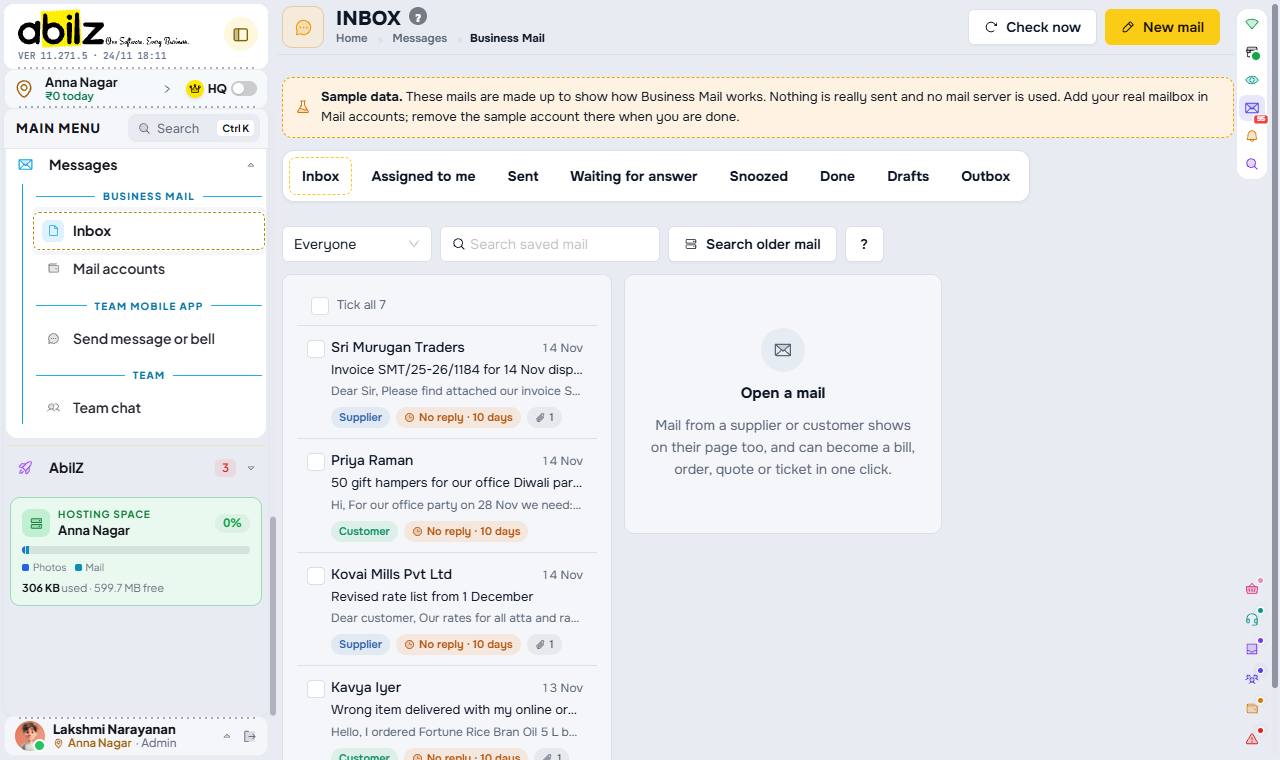
| Page | What it is for |
|---|---|
| Inbox | New mail of every account you may open. The number is unread mail. |
| Assigned to me | Mail someone gave you. |
| Sent | Mail sent from AbilZ, and the Sent folder of the mail server. |
| Waiting for answer | Mail you answered and are waiting to hear back on. |
| Snoozed | Mail put away until a later time. |
| Done | Mail marked Done. Back to inbox brings it back. |
| Drafts and Outbox | Mail not sent yet, and mail on its way out. |
| Mail accounts | Add, test, change or remove a mailbox. |
| Mail settings | HQ's rules for every location. |
Connect a mailbox (Mail accounts › Add mail account):
- Type the email address. For Gmail, Zoho, Outlook.com, Yahoo and Rediffmail the server settings fill in by themselves. For your own domain they start as
mail.<your domain>; change them if your host says otherwise. - Type the password. Gmail needs an app password: Google account › Security › 2-Step Verification on › App passwords. Paste the 16 letters.
- Press Save and test. AbilZ signs in to read (IMAP) and to send (SMTP). Only a tested account fetches mail.
- Change the server, the user or the password later and it must be tested again.
Reading:
- New mail is checked every 3 minutes. Check now checks at once.
- Pictures from the internet stay hidden until you press Show pictures. This stops tracking pictures.
- Attachments are not saved in AbilZ. Open or Save gets them from the mail server each time.
- Only the last 100 mails of each account are kept here. Search older mail looks on the mail server. What it finds is shown, not saved.
- Remove takes the copy out of AbilZ. The mail stays on the mail server.
Linked to suppliers and customers:
- Mail from a supplier's or customer's email address links to them by itself. Their page has a Mails tab: a customer's record, and the supplier window under Purchases › Suppliers.
- With Link by company address on (Mail settings), anyone at their company domain links too, for example
@sribalaji.in. Free addresses such as Gmail or Yahoo never link this way. - A sender not linked yet shows Linked to … Not a supplier or customer yet. Pick Supplier or Customer and find them, or press New supplier / New customer.
- Not this one removes a wrong link.
Turn a mail into work:
- Make purchase bill, Make order, Make quote first show what AbilZ read from the mail:
- each line (like "Toor Dal x 50 @ 115", or a table of item / qty / rate) with the item it matched in your catalogue, the quantity and the rate;
- a close match says "Please check"; a line with no item says "Not matched: find the item", and if left so it goes on the draft as a note row;
- untick a line to leave it out; change any item, quantity or rate;
- a rate missing in the mail takes the item's last cost (purchase) or selling price (order, quote);
- for a purchase bill, the supplier's bill no. and the bill amount from the mail. Press Make draft …: the draft opens with the supplier or customer, the lines, the note "From mail: subject (sender, date)" and the supplier's bill no. Check it and save. Nothing is saved before you press Make.
- Duplicate bill check: when the supplier's bill number in a mail is already on a purchase, the mail says "Bill … is already in your books" with a button to open it. Making it again asks first.
- Raise ticket: a customer complaint goes into Customers › Feedback & reviews as Open, with the mail's words.
- The suggested button is marked green. For example, a supplier mail that says invoice suggests Make purchase bill.
- Made from this mail lists what was made, with links.
Team work:
- Assign to gives the mail to someone who can open that account. It then shows in their Assigned to me.
- Notes for the team are seen only by staff, never by the sender.
- Done when it is dealt with. The menu count shows only waiting mail.
Replies:
- Reply opens the reply window. Pick a template; for a supplier, Supplier invoice received comes first.
- Every mail sent carries the business logo on top and the signature under it.
- The templates and the signature are in Settings › Templates & designers › Messages Designer › Business Mail replies. HQ can lock them or let locations change them.
More help when making a bill, order or quote:
- Items from the PDF: when the mail itself has no item lines, AbilZ reads the supplier's PDF invoice (rows where qty × rate = amount; line numbers and HSN codes are skipped), with its bill no. and total. A scanned picture PDF cannot be read (that needs AbilZ Intelligence). The PDF is read on your own server and is not saved.
- Price check: each line shows your last cost, for example Last ₹44 (+4.5%), red when the price went up, green when it went down; a note above counts the price rises.
- Stock check: for a customer's order or quote, an In stock column shows the stock at this location; Out of stock / Only 6 here in red when short.
- Remembered: when you pick an item for a line, AbilZ remembers it for that supplier or customer (As you picked before), so next time it matches by itself.
- Create item: a line with no item has Create item: the quick new item form, filled with the name and rate from the mail.
New supplier or customer from a mail: a sender who is not linked has New supplier and New customer: the name and email are filled in (a customer needs a mobile). Their other mails from that address link too.
Conversations: the inbox shows one row per conversation (a subject with one supplier, customer or address, Re: and Fwd: ignored), with the number of mails in it. Opening a mail shows This conversation: every mail of it both ways, oldest first; click one to open it.
Someone is replying: while a person has the reply window open, others see Kumar is replying to this mail now on the mail and Kumar replying in the list, and the reply window warns them before they answer too.
Not important / Block sender: Not important moves a mail to Done (no reminder). Block sender (only for a sender who is not a supplier or customer) blocks the address, or everyone at the company (@domain; never a free mail domain such as Gmail): their mails go to Done, never ring the bell, and come back when you Unblock them in Mail settings › Blocked senders.
Business Mail report (Reports › Customers & marketing › Business Mail report): for the last 7, 30 or 90 days: received, answered (and %), average and middle reply time, waiting and late now, bills / orders / tickets made from mail, blocked; per mailbox; replies by person (and how many within the reminder time); who writes most. Counts come from the mails kept in AbilZ.
Dues on the side panel: a supplier's mail shows You owe them ₹…, their terms, orders on the way, the last 3 bills (with their bill no. and what is due) and the last payment. A customer's mail shows They owe you ₹… (counter dues + unpaid invoices), points and the last 3 bills. Click a bill to open it.
Not answered: a mail from a supplier or customer with no reply from AbilZ and not Done shows No reply · 26 h in the inbox, and after the time in Mail settings › Remind when a mail is not answered (1 day at first; 4 h, 8 h, 2 or 3 days, or never) the bell reminds. Reply or press Done and it stops. A reply shows Replied on the mail.
Documents from the location's mailbox: invoices, quotations and purchase orders sent with Send › Email go from the location's own Business Mail mailbox (the one with Send this location's invoices… from this mailbox on, else its first working one). The answer comes back into its Inbox, linked, and the sent mail is in Sent. Off in Mail settings, or with no working mailbox, they go from the business email server as before.
Menu counts: Inbox shows the unread mails waiting, Assigned to me the mails given to you and not done.
The bell:
- New unread mail from a known supplier or customer, from the last 3 days.
- No reply yet after the reminder time (amber).
- An account that has not connected 3 times in a row (red). Its accounts page says Retrying after 1 or 2 misses.
Who sees what:
| Person | Sees |
|---|---|
| Owner (HQ Admin) | Every account, except a franchise outlet's when HQ may read franchise outlets' mail is off |
| Manager / staff | Accounts of their locations whose role is allowed (Team › Roles & permissions › Business Mail, and Mail accounts › Who can open it) |
| HQ shared account | The locations ticked on it, plus the owner |
HQ Admin:
- Messages › Business Mail › Mail accounts in HQ view (the owner) shows every location: module, accounts, connected or not, unread, waiting, saved mails and the mail storage used. It shows no mail.
- HQ › Payments & messages › Business Mail shows the same counts.
- Locks (Mail settings › Who adds mail accounts): Open, each location's manager adds its own; Locked, only HQ.
- HQ shared accounts, like purchase@ or hq@, are set up on Mail accounts by the owner. They use the Main Store licence's accounts.
Storage:
- The words of each mail are a small file in the location's own space (
documents/mail/<month>/), counted in This Location Storage. - HQ shared accounts keep theirs in the business space (
owner/mail/). - When the space is full, new mails are still listed. Their words then load from the server.
Something wrong in this guide?
