

Restaurant opens as its own menu. Tap the Restaurant row in the Main menu; ‹ Main at the top takes you back.
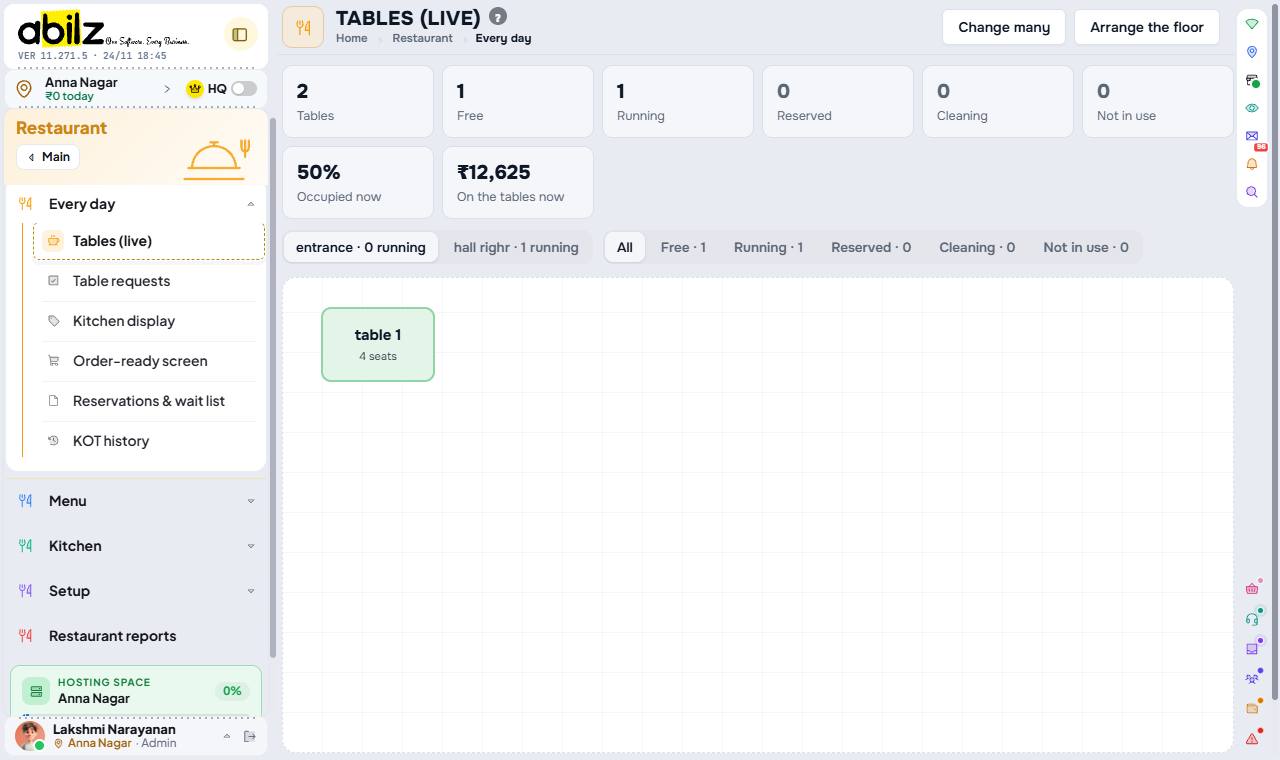
- Every day: Tables (live), Table requests, Kitchen display, Order-ready screen, Reservations & wait list, KOT history.
- Menu: Menu & recipes (with the Menu timings and Prices by order type tabs at the top), Happy hours & deals, QR menu.
- Kitchen: Ingredients & wastage, Kitchen stations & printers.
- Setup: Tables & floor plan, Captain app, Self-order kiosk, and Restaurant (the lists your dishes use: courses, allergens and kitchen requests).
- Restaurant reports.
Note How the counter works for tables, the table QR and the kiosk is set in Settings › Selling & POS › POS settings, in the Restaurant group.
Recipes for goods you make to sell in a shop (not dishes) are in Items › Production › Recipes.
Was this helpful?
Something wrong in this guide?
Still stuck?Press ? in your portal, then Raise a ticket. It carries the page you are on.
Contact AbilZ