

Keep each person's day: present, absent, leave, half day or weekly off.
Team › Time › Attendance & leave. Keep each person's day: present, absent, leave, half day or weekly off. The tabs are Today, Month register, Leave & requests and Shifts & rules.
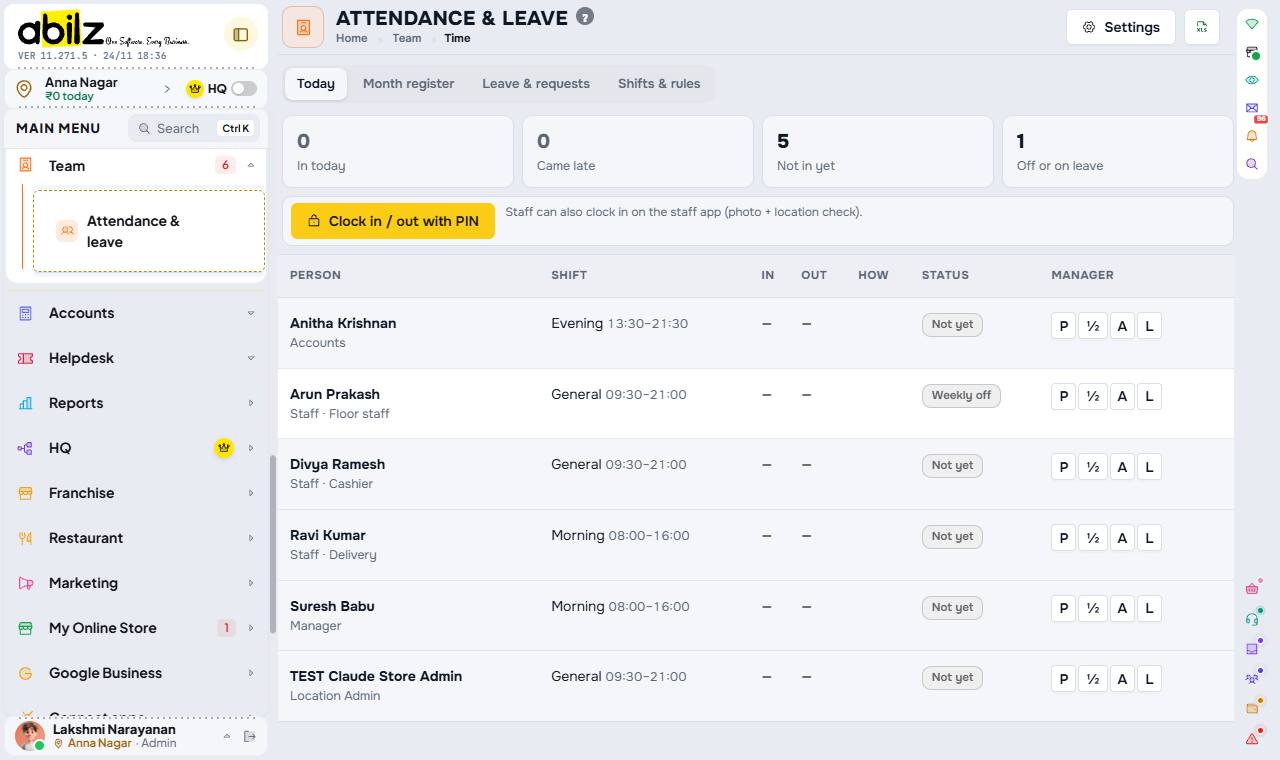
- Today: who is in, came late, is not in yet, or is off or on leave, with each person's shift, in and out times and clock-in photo. Clock in / out with PIN clocks someone in at this screen; a manager can mark a day (present, half day, absent, leave) on the row.
- Month register: the month as a grid, one row per person. Tap a day to mark it. When you mark leave, it comes off that person's leave balance; weekly offs and holidays do not.
- Leave types: you start with Casual leave 12, Sick leave 12 and Earned leave 15 days a year. Earned leave carries forward up to 30 days; Casual and Sick leave end with the leave year. With no balance left, the day is Loss of pay. Change the types and days in Staff Attendance settings.
- Half-day leave: takes 0.5 day from the balance.
- Team › Time › Shifts & rota: set who works which shift on which day.
- Corrections: staff can ask to correct a day they got wrong (for example, forgot to clock out). A manager approves or refuses it. Settings say how many days back they may ask.
- Clock in from the phone (Staffs app): staff clock in and out with a selfie at the store.
- The phone must be within the store distance. It starts at 100 m; the owner can change it.
- Outside the distance, the clock-in waits for a manager to approve it.
- Fake GPS is refused.
- Selfies are kept for 90 days by default (0 = always). Each day shows the selfie and See on the map.
Was this helpful?
Something wrong in this guide?
Still stuck?Press ? in your portal, then Raise a ticket. It carries the page you are on.
Contact AbilZ