

Reports › All reports lists every report by area (POS sales, Invoice sales, Purchases, Stock, People, Tax, Money…).
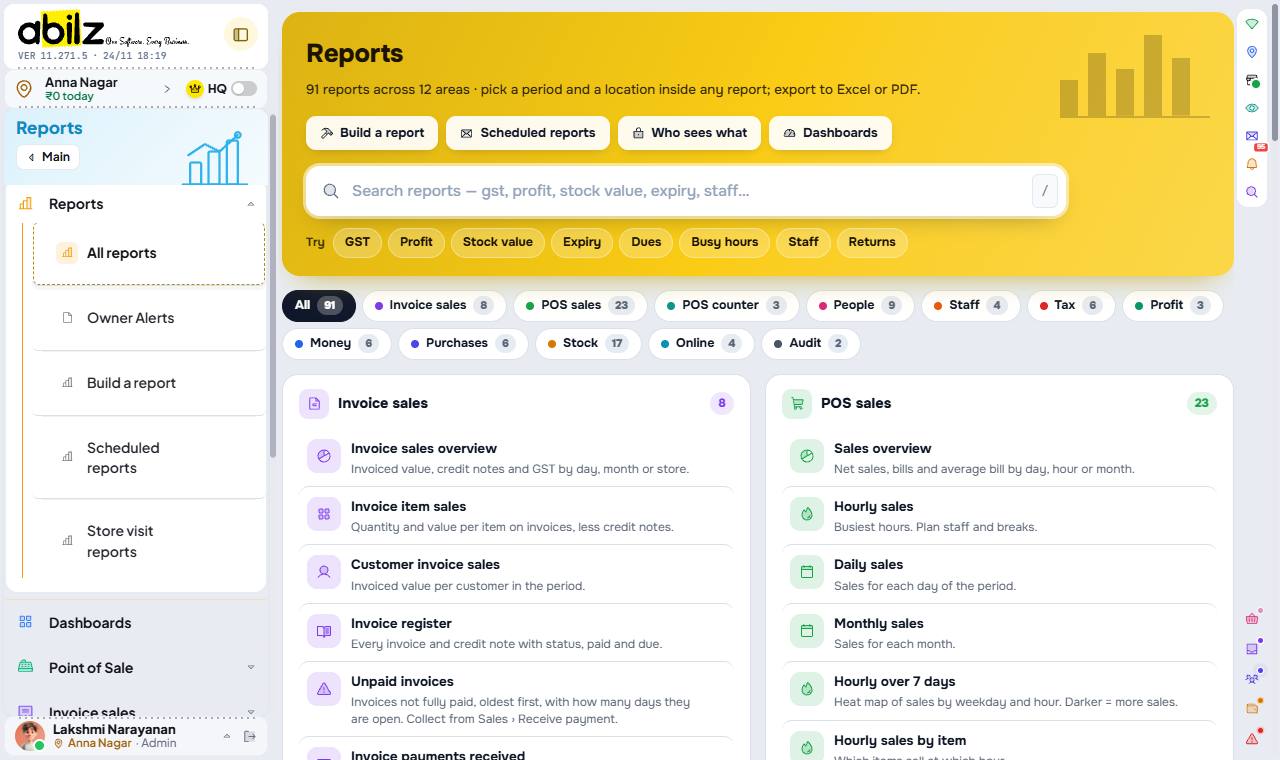
Reports opens as its own menu from its row in the Main menu (‹ Main goes back). Its first row, Reports › All reports, lists every report in coloured cards by area (POS sales, Invoice sales, Purchases, Stock, People, Tax, Money…).
- Search at the top understands related words (gst, profit, stock value, expiry, staff…). Press / to jump to the box, the arrow keys to move and Enter to open. Try gives a few ready words.
- The area chips under it show one area at a time, with how many reports each has; All shows them all again.
- Recently opened brings back the reports you opened last, and Your saved views lists your saved views.
- The buttons at the top open Build a report, Scheduled reports, Who sees what (owner only) and Dashboards.
Every report also has its own row in the Reports menu, under its section (Point of Sale, Invoice sales, Purchases, Stock, Customers & marketing, Accounts & GST, Team, Online, Logs & history), and Ctrl K finds any report by name.
Note You see only the reports your role may open, for the locations you work at. In HQ view the owner sees every location: see HQ view.
Was this helpful?
Something wrong in this guide?
Still stuck?Press ? in your portal, then Raise a ticket. It carries the page you are on.
Contact AbilZ