

Marketing › Customer Connect has four parts. Each part has its own on/off switch, a preview of the message as the customer reads it, what it did in the last 30 days, and Send me a test and Change buttons.
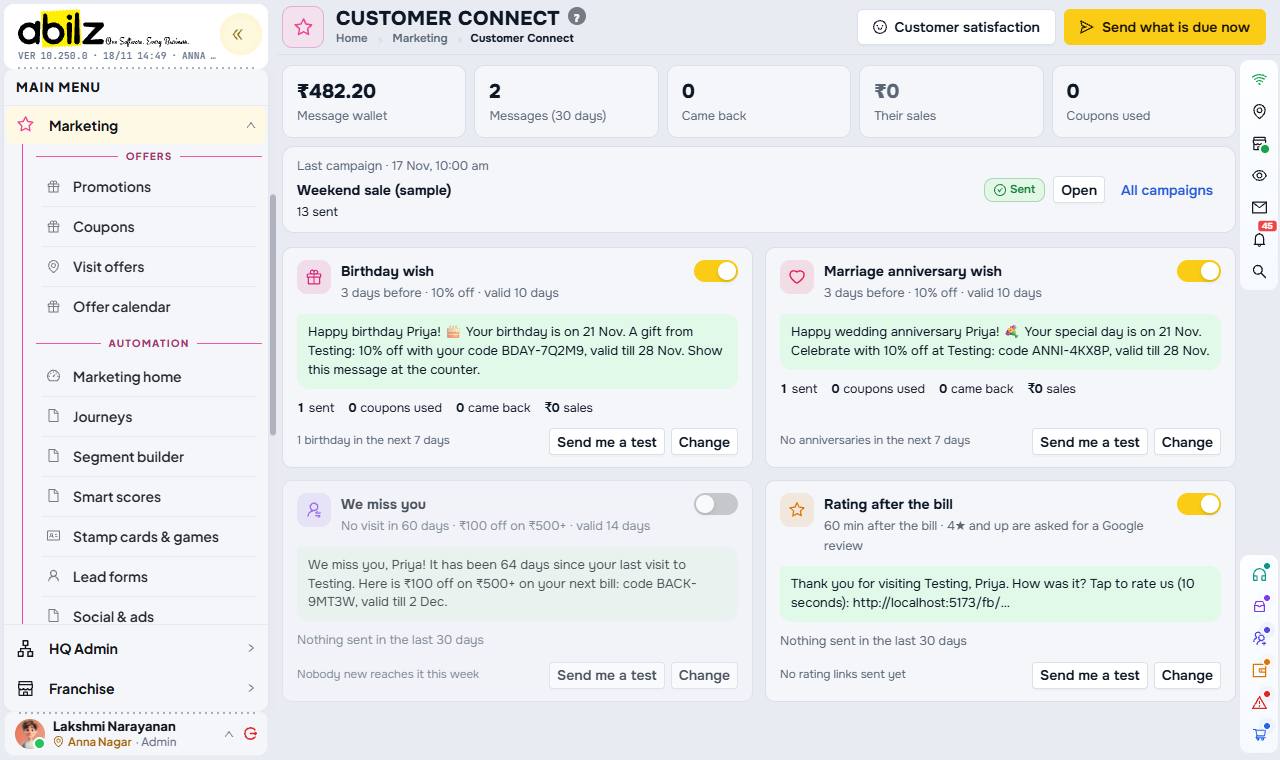
- Birthday wish. Goes 3 days before the birthday (you can change this; 0 means on the day). It carries the customer's own coupon code, for example 10% off, valid 10 days.
- Marriage anniversary wish. The same as the birthday wish, from the Marriage date on the customer's page.
- We miss you. Goes to customers who have not come for 60 days, with a coupon (₹100 off a bill of ₹500 or more). If they still have not come, it goes again after 45 days at the earliest. It starts switched off: when you turn it on, every customer who has stayed away gets it at once.
- Rating after the bill. One hour after each bill, the customer gets a link and rates the visit with 1 to 5 stars, with an optional comment.
- Happy customers (4 and 5 stars) see Share it on Google. It opens the store's Google review link.
- Unhappy customers (1 and 2 stars) reach the approvals inbox as "Unhappy customer", so someone calls them back.
Coupon codes:
- Each wish makes one code for that customer only, for example BDAY-7Q2M9, ANNI-4KX8P or BACK-9MT3W.
- A code works once, only for that customer, until its last day, at the stores with Customer Connect.
- At the counter, type the code like any coupon. The customer must be on the bill.
Who gets messages:
- Only customers who agreed to messages get anything.
- A customer whose home store does not have the module gets nothing.
- Nobody gets the same wish twice in a year.
When they go: every day after 9 am. The rating links are checked every 10 minutes. Send what is due now sends at once anything that is due.
The message wallet: every message is paid from the WhatsApp & SMS wallet. When the wallet is too low, the page says how many messages could not go. They go on the next run after you top it up.
The words: press Change to edit them. Tap a tag to add it:
| Tag | What it becomes |
|---|---|
| {name} | the customer's first name |
| {when} | "today" or "on 14 Nov" |
| {offer} | the offer, for example "10% off" |
| {code} | the customer's code. It must stay in the message. |
| {valid} | the last day of the code |
| {store} | the store's name |
| {shop} | the business name |
| {days} | days since the last visit |
| {points} | the customer's loyalty points |
| {link} | the rating link. It must stay in the message. |
The Google review link: set it per store with Change on the Rating after the bill part. When it is empty, the link on the receipt design is used.
Customer satisfaction (Customers › Feedback & leads › Feedback & reviews › Customer satisfaction, a tab at the top) shows:
- this month's average rating against last month;
- the share of happy customers;
- how many customers answered the rating link;
- a bar for each month;
- each store and each member of staff (who made the bill) over the last 90 days, lowest first;
- the latest customers who were not happy.
When the month's average is below 4★, or falls by 0.3★ or more from last month, the bell shows Customer ratings fell. You can change both levels with Change on the Rating after the bill part.
Other places that change with the module:
- Feedback & reviews: Ask for Google review sends a real WhatsApp message with the store's link, once for each feedback. Each feedback now shows the bill and the staff member.
- WhatsApp & SMS campaigns: the personal tags {lastitem} (the last thing they bought), {points} and {days} work in campaigns.
- Automatic messages: the old Birthday wish and We miss you show "Sent by Customer Connect", so nobody gets both.
Something wrong in this guide?
