

See which regular customers are slipping away, biggest first, and bring them back with one click or by themselves.
Marketing › Automation › Win-back. Every regular customer has their own rhythm. A customer who comes every week and has not come for 3 weeks is slipping away. A customer who comes once a month is not. Win-back watches each regular and tells you who to call before they are gone. It is part of the Win-back module (AbilZ › Marketplace).
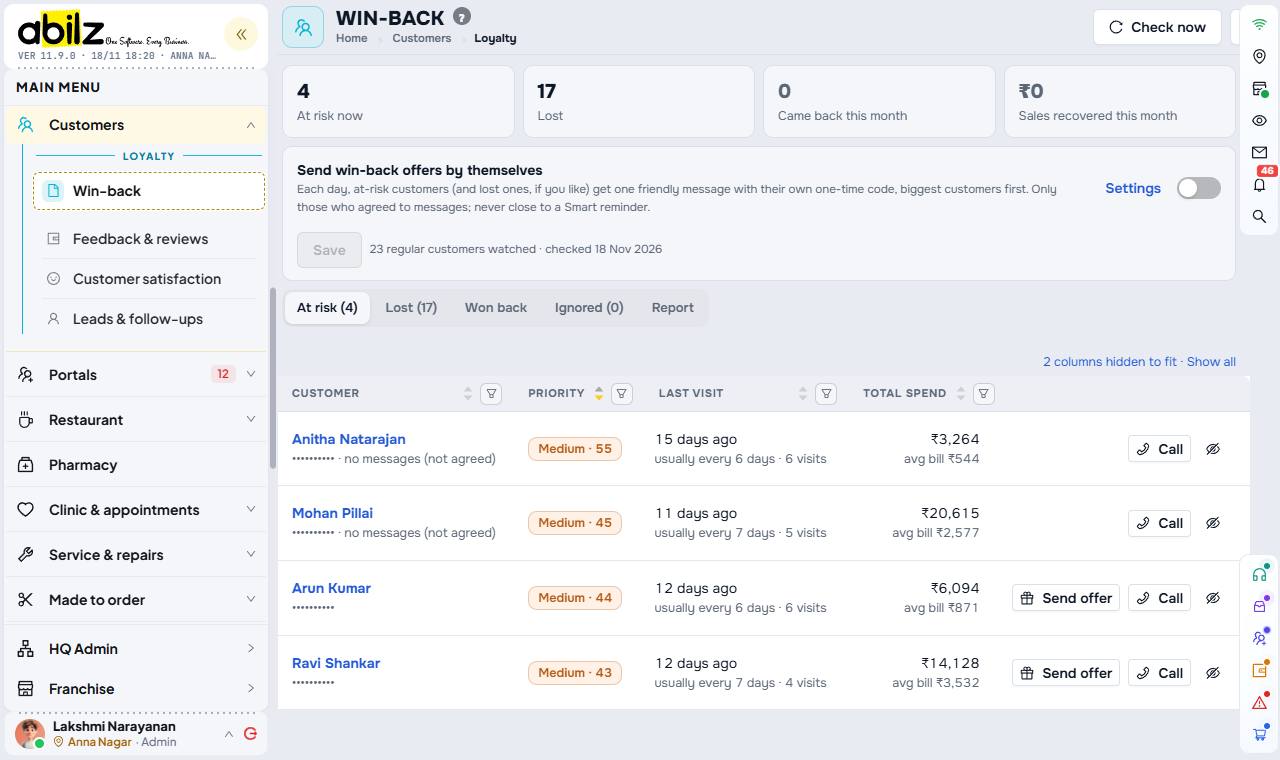
Who shows here
- Regulars only: customers with at least 3 visits (you can change it), so one-time buyers never show.
- At risk: away longer than 1.5 times their usual gap. A weekly customer shows after about 11 days.
- Lost: away longer than 3 times their usual gap.
- Priority (High, Medium, Low) puts first the customers who are most overdue, came most often and spent the most.
AbilZ checks every customer once a day from the bills. Press Check now to check again at once.
What you can do
- Send offer: sends one friendly message with your offer and the customer's own one-time code: "Hi Kavya, we miss you at Style Studio! Your favourite hair spa is waiting. Here is 10% off on your next visit with code CX7K2PQ, valid till 2 Dec." The code works once at billing, so you can see who used it.
- Call: rings the customer from your phone.
- Ignore (the eye): leaves the customer out, for example if they moved away. They come back on the list by themselves if they visit again.
When they come back
A customer at risk or lost who buys again is active again. They show under Won back with the sales since, and whether they came After our offer or By themselves.
Offers by themselves
Switch on Send win-back offers by themselves and press Settings to choose:
- the offer: % off, ₹ off or a Free add-on such as a head massage; how many days the code is valid; a minimum bill
- whether lost customers get it too
- At most one offer to a customer every 30 days, the offers a day limit and the sending hours
- Keep away from a Smart reminder by 3 days, so a customer never gets a reminder and a win-back offer close together
- the message in English and Tamil:
{name}first name,{shop}your shop,{item}what they buy most,{offer},{code}and{valid}the last day
Report
The Report tab shows each month: new customers at risk, newly lost, offers sent, how many came back (and how many after an offer) and the sales recovered. Below it is every offer sent and how many codes were used at billing.
Something wrong in this guide?
