

Remind each customer when it is time again (haircut, pet food, water cans), with everything due close together in one friendly message.
Marketing › Automation › Smart reminders. For things customers come back for again and again: a haircut every 3 weeks, a beard shave every 15 days, pet food every month, water cans every week, medicines every 30 days. It is part of the Smart Reminders module (AbilZ › Marketplace).
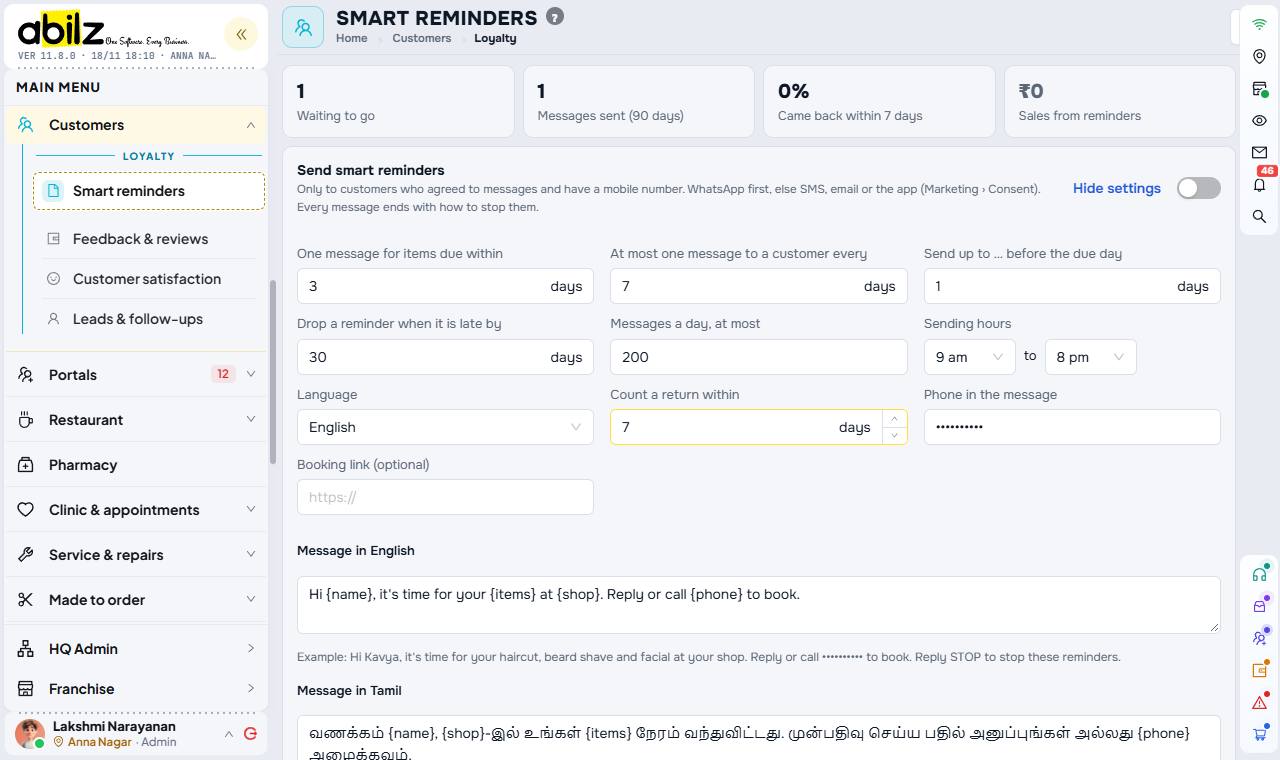
Choose the items
- Open the Items tab and press Add items. Search for the item, tick it and set Remind every … days.
- To change many items at once, tick them in the list and press Change. Pick Remind every … days, Learn from each customer's bills or Never remind.
- Name in the message is the friendly word the customer reads, for example "beard shave" in place of "Shave - Premium (M)".
How the messages go
- One message, not many. Everything a customer has due within a few days goes in one message: "Hi Kavya, it's time for your haircut, beard shave and facial at Style Studio."
- A gap between messages. A customer gets at most one reminder every 7 days (you can change it). Items that fall due in between wait and join the next message.
- Only in shop hours, 9 am to 8 pm by default, and never more than your daily limit.
- Buying again starts fresh. When the customer buys the item again, the old reminder is cancelled and a new one starts from that day. Nothing to do at the counter.
- Too late is dropped. A reminder more than 30 days late is not sent.
- Only customers who agreed to messages and have a mobile number get reminders. WhatsApp goes first, then SMS, email or the app, as set in Settings › Customers & marketing setup › Consent & limits. Every message ends with how to stop them.
Settings
Switch on Send smart reminders, then press Settings to change the days, the hours, the daily limit and the language (English, Tamil, or each customer's own). Write the message in English and Tamil: {name} is the customer, {items} the items in natural words, {shop} your shop, {phone} your phone and {link} your booking link.
The lists
- Reminders: pick Waiting, Sent, Cancelled, Failed or Expired, and filter by item, dates or customer. On a waiting one press Send now (the whole group goes at once), Move to another day, or ✕ to cancel it.
- Messages: every message, how it went and whether the customer came back.
- Success by item: how many reminded customers came back within 7 days, and how many bought that item again.
Something wrong in this guide?
