

Runs every night and on Check now; finds bills missing from the books, wrong dues, GST gaps and more, and fixes them only when you press Fix.
Accounts › Books check. Books check runs every night and when you press Check now. Nothing is changed by itself: open a problem, look, and press Fix (one, some or all). Every fix shows in the day book with "Books check" in its words.
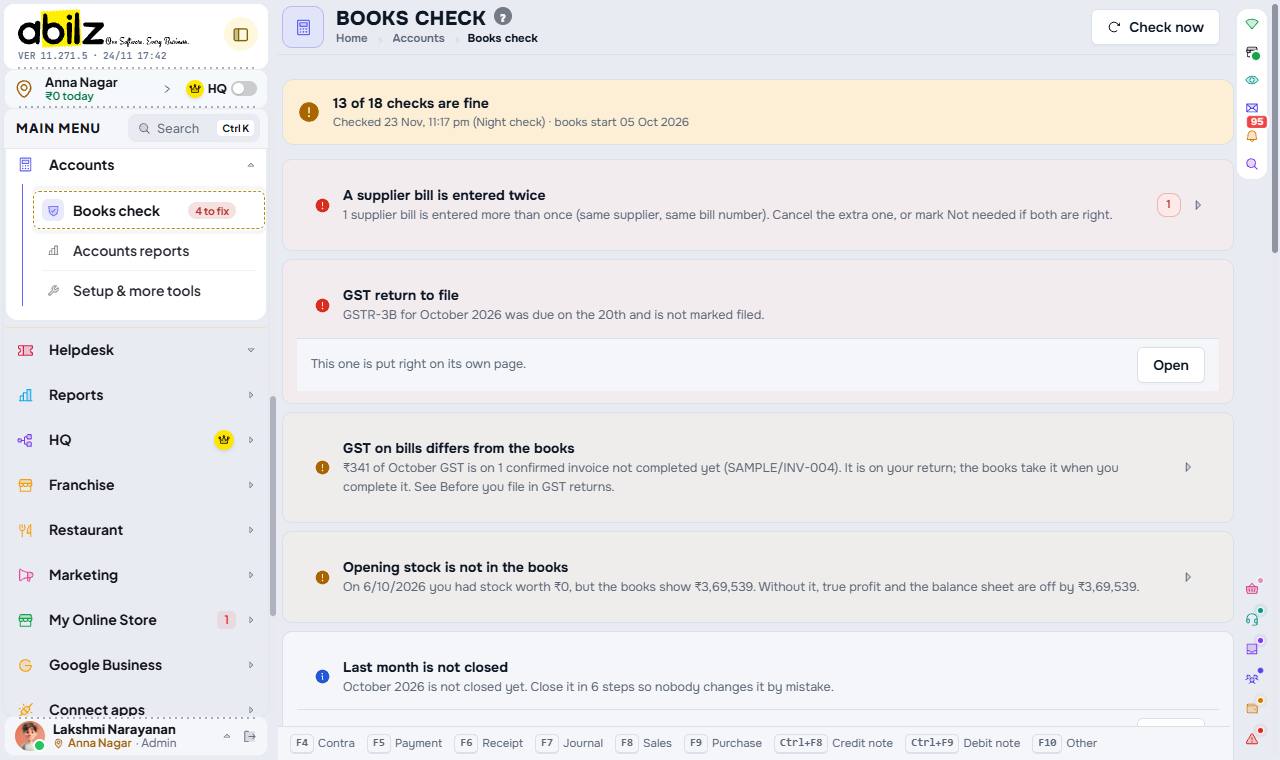
What it checks
- The books balance, every bill is in the books, cancelled bills are out.
- Customer and supplier dues match; it names each customer whose due is wrong and fixes it (a due typed with no bill becomes an opening due).
- GST on bills matches the books, and every document is in its own month.
- Opening stock is in the books, cash is never below zero, counter cash short or extra is booked.
- Bank lines are matched, cheques are deposited on time, last month is closed, the GST return is filed.
- Items in stock have a cost, expenses have a bill photo, paid AbilZ software bills are in the books.
Not needed
A row of an old cheque, an item kept at no cost, a bank line, a customer due or an AbilZ bill can be marked Not needed with a reason, and brought back later.
Tip Day close shows a books score from 0 to 100 and what would lift it.
Was this helpful?
Something wrong in this guide?
Still stuck?Press ? in your portal, then Raise a ticket. It carries the page you are on.
Contact AbilZ