

Amount, what for, paid from, GST and a bill photo; repeat monthly costs, and let the owner approve big ones.
- Open Accounts › New entry › Expenses and press New expense. The types you use most are buttons on top: tap one, then type the amount, paid from, GST, and add a bill photo.
- For rent, electricity or internet, tick Repeat every month.
- To record the same thing again (the weekly tea bill, the monthly courier), press the Same again button (two pages) on its row: a new expense opens with the same type, amount and payment, dated today. Change what you need and Save.
- Pick a cost centre if you track events or projects (Cost centres), and Paid by a company card if you used one.
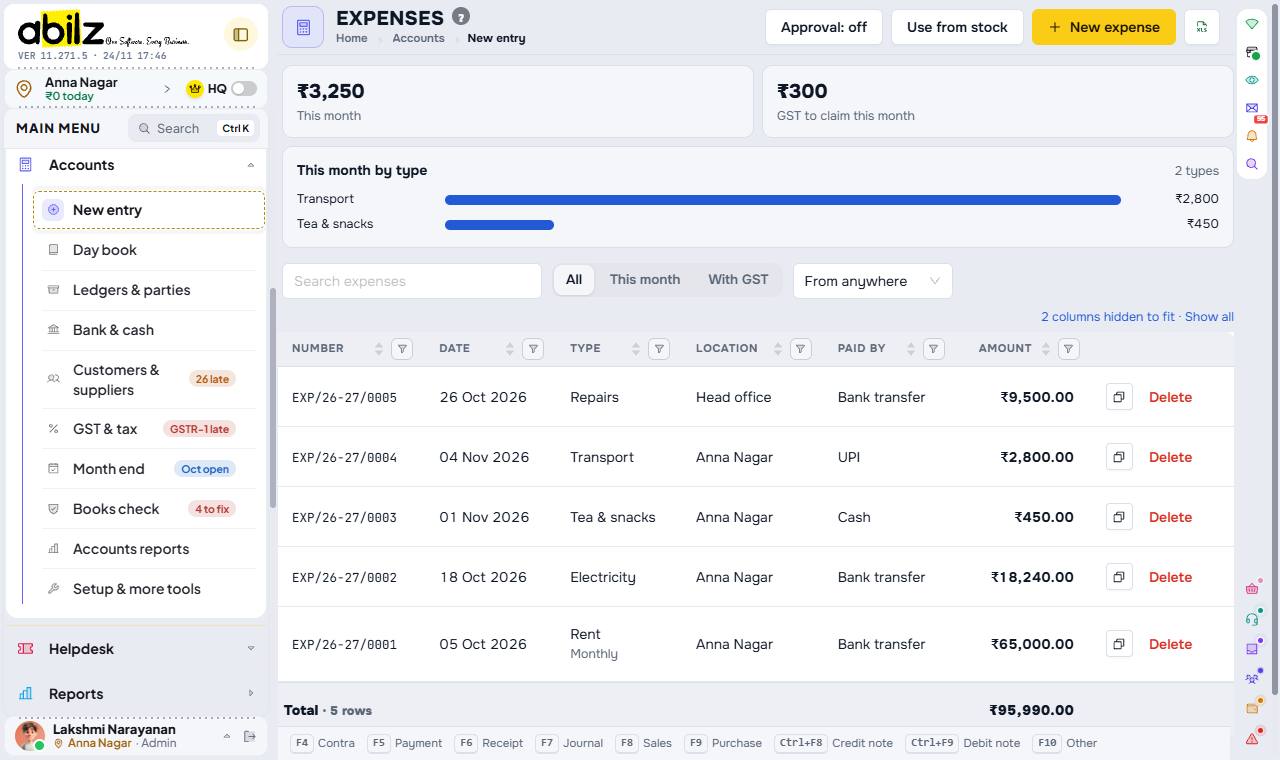
- At the top: what you spent This month and the GST to claim this month. Search, or pick All, This month or With GST.
- This month by type shows where the money went this month, biggest first.
- From anywhere filters by where an expense came from: typed here, the counter (POS cash out), petty cash, a purchase (paid to others), from stock (used in the shop) or a monthly entry. The source shows under the type; a purchase one opens that purchase.
- Use from stock takes stock your shop uses itself out at cost, as an expense.
- The owner can set Owner approves above ₹…: a bigger expense from the team waits (marked Waiting for the owner) and goes in the books only when the owner presses Approve.
- Books check lists expenses without a bill photo.
- Transport, loading or coolie paid for a purchase is added on the purchase itself under Paid to others: it becomes an expense linked to that purchase when the goods come in (Freight and other charges).
- Stock the shop uses itself (carry bags, cleaning liquid) is taken with Use in the shop on the item: it is an expense at cost, paid From stock (On the item screen).
Tip Small daily spends by staff go through Petty cash.
Was this helpful?
Something wrong in this guide?
Still stuck?Press ? in your portal, then Raise a ticket. It carries the page you are on.
Contact AbilZ