

Payables shows each supplier's bills; the payment plan says which bills to pay this week within the money you have.
- Open Accounts › Customers & suppliers › Payables and tap a supplier: what you owe, how late, the open bills and a statement.
- Accounts › Customers & suppliers › Supplier payment plan says which bills to pay this week: late first, then due this week, then early-payment savings, within the money you have, with an amount you can keep aside.
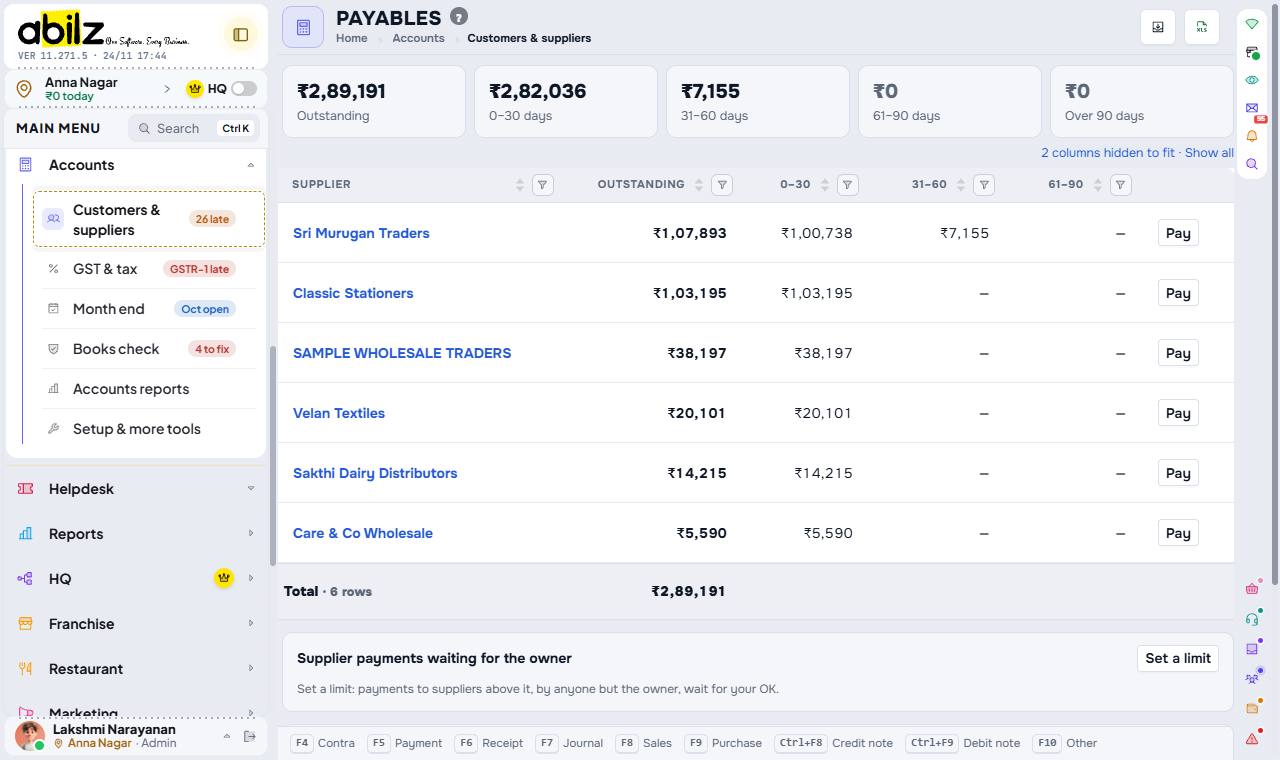
- Pay them: each supplier to pay this week has a UPI QR (the amount and bill numbers filled in) or goes into one Bank file for your bank's bulk payment upload. Add the supplier's UPI ID, bank account and IFSC on the supplier (Purchases › Suppliers), or the supplier gives them in the Supplier Portal. Then record the payment in Payables.
- MSME suppliers must be paid within 45 days; they are marked.
- Duplicate bills from the same supplier are found.
- GST credit at risk after 180 days unpaid is shown.
Tip Check new bank details with the supplier by phone before the first payment. Most UPI apps allow up to ₹1 lakh in one payment; pay bigger bills by bank transfer.
See also Supplier claims and Big payments to approve.
Was this helpful?
Something wrong in this guide?
Still stuck?Press ? in your portal, then Raise a ticket. It carries the page you are on.
Contact AbilZ