

Six steps checked for you, then Close and lock so nothing before that date can change.
- Open Accounts › Month end › Close the month. Six steps are checked for you: bank matched, cash counted, monthly entries posted, depreciation posted, stock value checked, GST and bills checked.
- Each step says what is left and has its own button (Post them, Post depreciation, Put them in the books). Mark done is for what the books cannot see.
- Costs whose bill has not come (electricity, a contractor; also Accounts › Month end › Month-end costs): book them in their month; they are taken back by themselves the month after.
- Press Close and lock: nothing on or before that date can change. Only the owner can unlock, with the password, in Accounts › Month end › Period close & lock.
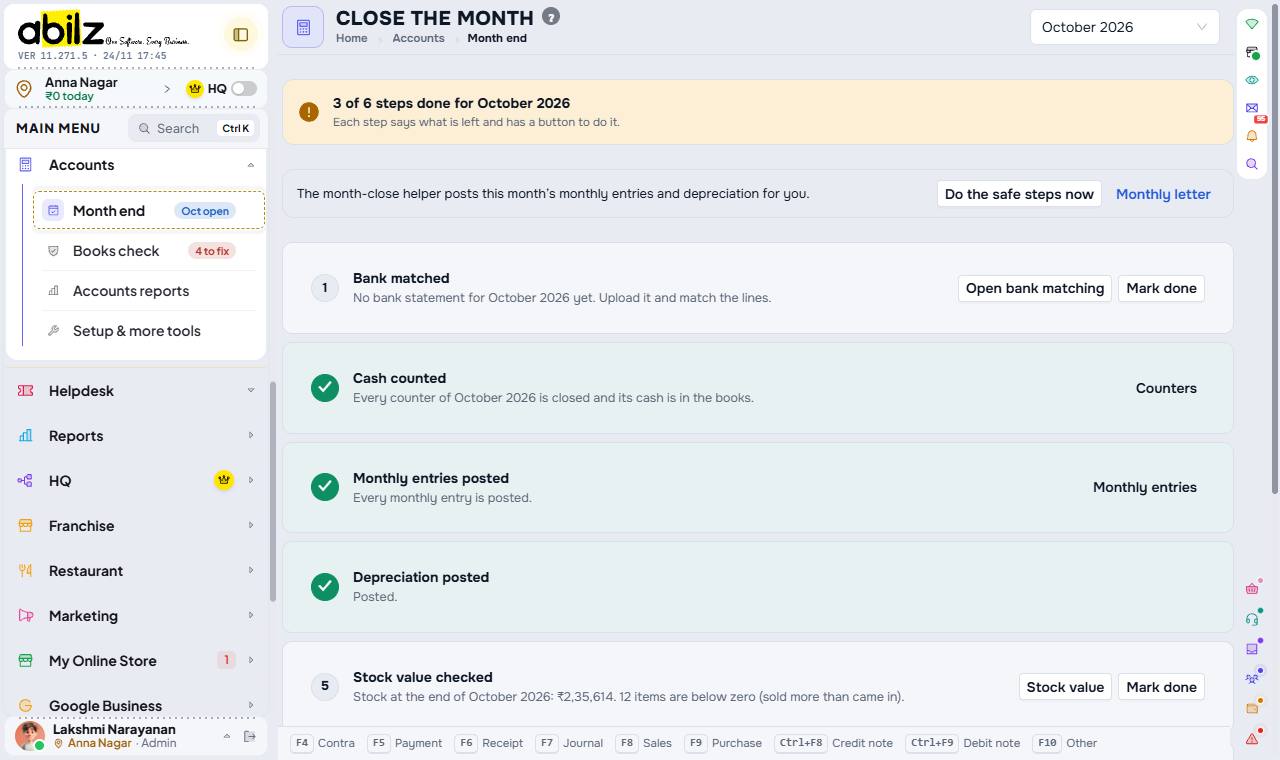
Tip On the 1st the month-close helper posts last month's monthly entries and depreciation and tells you what is left (switch in Accounts › Month end › Monthly letter). In March, close the year too: see Year end.
Was this helpful?
Something wrong in this guide?
Still stuck?Press ? in your portal, then Raise a ticket. It carries the page you are on.
Contact AbilZ