

Before you file checks every bill, HSN, GSTINs, 2B and e-way bills; then download the JSON for the GST portal.
- Open Accounts › GST & tax › GST returns (GSTR-1, 3B). It starts with Before you file: every bill in the books, items without HSN, customer GSTINs that look wrong, input credit from suppliers without a GSTIN, credit notes without their invoice, and the due dates.
- Upload GSTR-2B as the portal gives it (JSON or Excel). The check compares the GST amount too (Tax differs) and shows the credit at risk.
- It also checks e-way bills above ₹50,000 and, above ₹5 crore turnover (one switch on Accounts › GST & tax › e-Invoice & e-Way bill), e-invoices.
- Download the JSON and upload it on the GST portal.
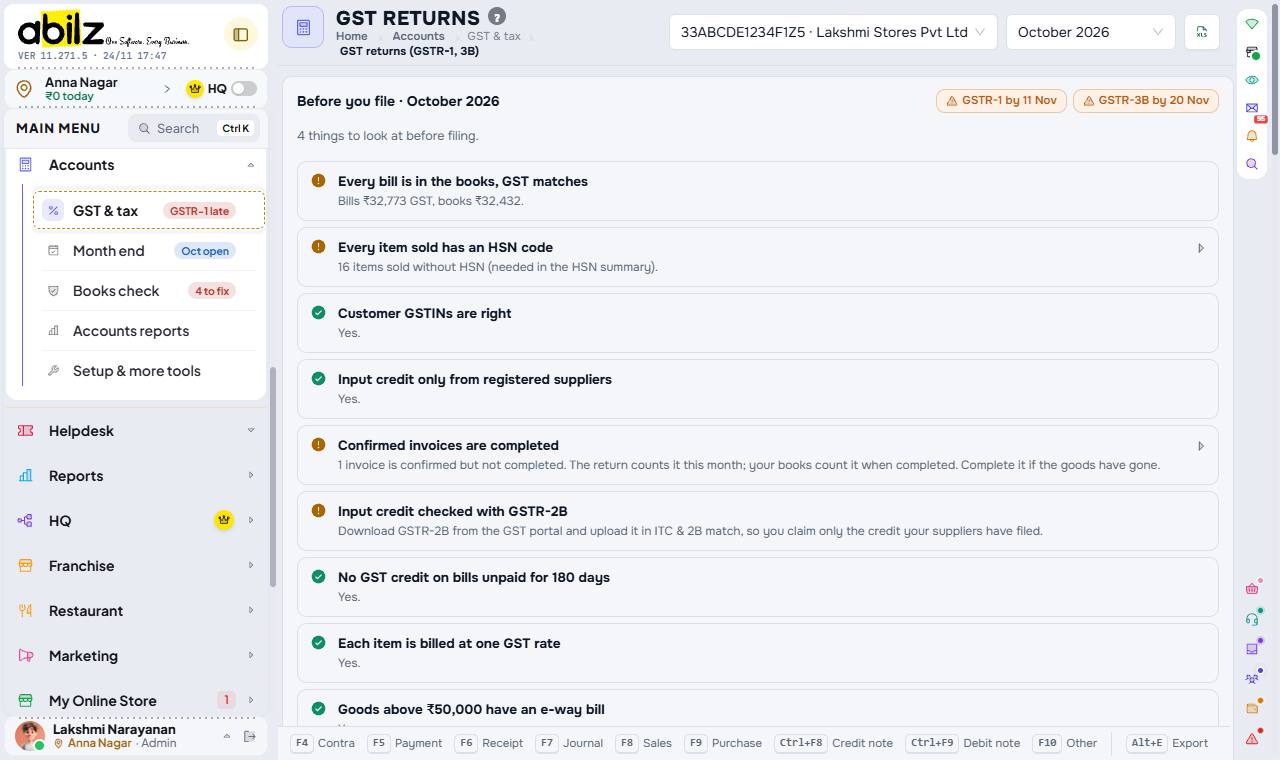
- Due dates: GSTR-1 by the 11th, GSTR-3B by the 20th. On the 9th and 18th you get a reminder with the real numbers.
- Accounts › GST & tax › GST summary & ITC shows your input credit; a weekly GST check runs every Monday.
Note File from AbilZ through a GST provider is ready but runs in sample mode until AbilZ connects the provider.
Was this helpful?
Something wrong in this guide?
Still stuck?Press ? in your portal, then Raise a ticket. It carries the page you are on.
Contact AbilZ