

The Accounts menu is eleven rows. Each opens a page with its tools as cards, and a small pill shows what needs you.
Accounts in the main menu has eleven rows. Each row opens a page that holds its tools as cards, with one line on what each card is for.
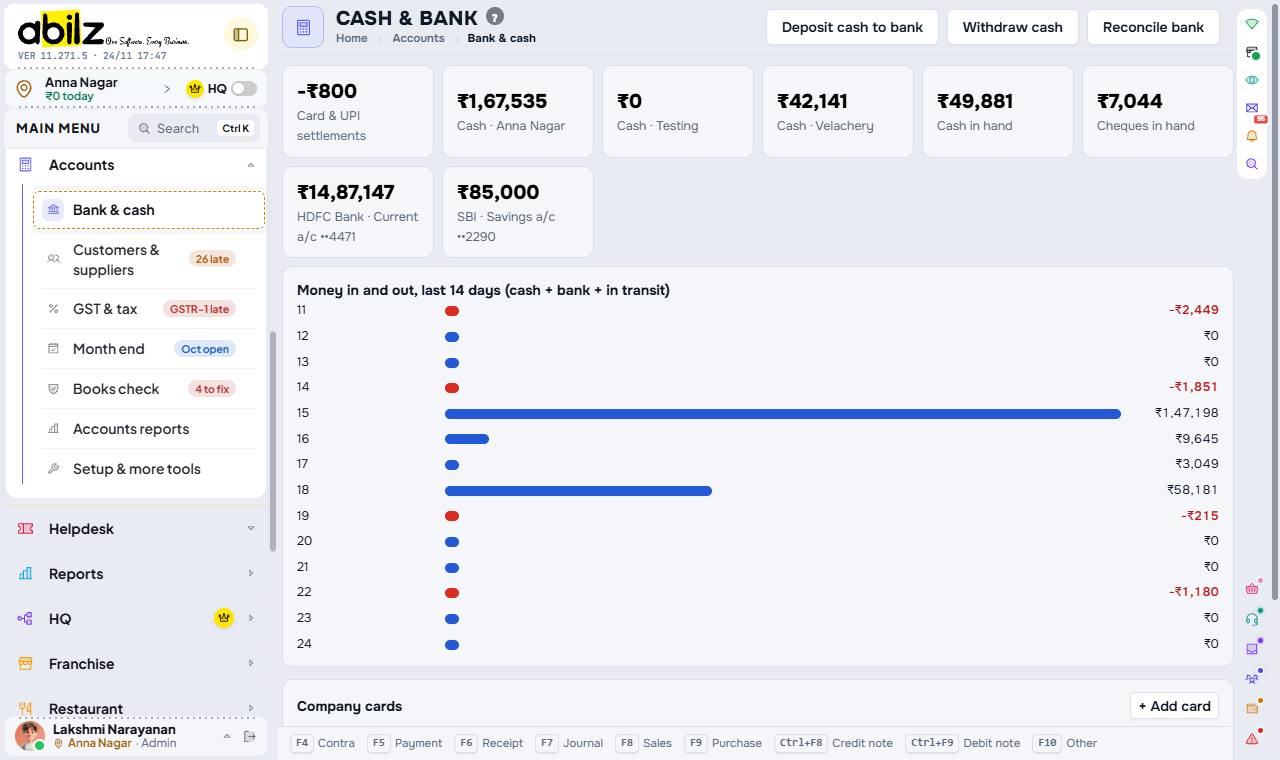
The eleven rows
Each row is a section of Accounts. Its page holds these tools as cards (the same names you find with Ctrl K):
- Money home: your money at a glance. In Accountant words it starts with the Gateway (see below).
- New entry: New voucher (money in, money out, cash to bank, adjustments, returns; each tile shows its key, like F5 for Payment), Expenses, Recurring entries, Rent agreements, Yearly payments by month and Income received in advance.
- Day book: every entry by date, Day close and the Watch list.
- Ledgers & parties: your accounts, customers and suppliers, Loans & owner, Fixed assets, Depreciation books, Cost centres and All businesses together.
- Bank & cash: Cash & bank, Bank reconciliation, Petty cash, Cheques & PDCs, Company cards, and Deposits & investments.
- Customers & suppliers: Receivables, Payables, Supplier payment plan, Supplier claims, Big payments to approve, Foreign currency dues, Advances & deposits, Marketplace payouts, and Costs & hours to bill.
- GST & tax: GST returns (GSTR-1, 3B), GST summary & ITC, e-Invoice & e-Way bill, TDS, Tax & due dates, GSTR-9 (year), TDS on purchases and the Tax audit helper. Shops outside India find their own tax pages here instead: US sales tax, Canada sales tax, VAT return (UK, UAE, Saudi Arabia, Oman, Bahrain, and GST & BAS in Australia) and ZATCA e-invoicing (Country tax modules).
- Month end: Close the month, Month-end costs, Period close & lock, Year-end, Bad debt reserve, Stock write-down, Staff dues set aside, Auditor pack, Edit log, Accountant desk and Monthly letter.
- Books check: fifteen checks that keep your books right.
- Accounts reports: Where the money went, Cost trends, Money ahead, Profit by store, Business health, Compare periods and Exceptions, with cards for Profit & loss, Balance sheet, Trial balance and the other statements.
- Setup & more tools: the accounts setup lists, your accounting software link, Download all my books, and the tools for special cases.
The statements themselves (Ledger statement, Trial balance, Profit & loss, Stock value, Balance sheet, Cash flow, Budget vs actual) are also in Reports › Accounts & GST. Reports opens as its own menu from its row in the Main menu; ‹ Main goes back.
Outside India
The pages speak your country's words: every amount is in your own currency, GST becomes your tax name, and the GST & tax row reads Sales tax in the USA and VAT & tax in VAT countries. Stock is valued by the method you pick: see Accounting settings.
The pills that say what needs you
A row shows a small pill only when something waits: 12 to match on Bank & cash, 3 late on Customers & suppliers, GSTR-1 in 2 days on GST & tax, Oct open on Month end. Books check shows how many things are to fix (for example 4 to fix), or a green count of checks passed when nothing needs fixing. A GST return past its date says GSTR-1 late. Point at a pill to read what it means.
For special cases
Tools you have not used yet (rent agreements, company cards, foreign currency dues and others) wait at the bottom of their page under For special cases. Once you use one it moves up to the cards. The owner or the accountant can show them all at once in Accounts › Setup & more tools with Show every accounting tool on the Accounts pages.
The Gateway (Accountant words)
Switch Money home to Accountant and it opens with the Gateway: Masters, Transactions, Utilities and Reports, each line with its letter. Press the letter to open it, for example D Day book, B Banking, S Balance sheet, P Profit & loss, T Trial balance, O Stock value, C Compare periods.
Tally keys
If you know Tally, the same keys work on every Accounts page, even while you type in a box:
| Key | Opens |
|---|---|
| F4 / F5 / F6 / F7 | Contra, Payment, Receipt, Journal |
| F8 / F9 | Sales invoice, Purchase bill |
| Ctrl+F8 / Ctrl+F9 | Credit note, Debit note |
| F10 | Other vouchers: stock adjustment, stock transfer, physical stock, delivery note |
| Ctrl+A | Save the entry |
| F2 / Alt+F2 | Change the date / the period |
| Alt+P / Alt+E / Alt+M | Print or PDF, Export, Mail |
| Alt+G or Ctrl+G | Go to any page or report |
| F3 | Change location |
| F11 / F12 | Accounting settings, Setup & more tools |
| Ctrl+Alt+B | Banking |
| Ctrl+Q | Back |
On Accounts pages Alt+M sends mail, as in Tally; fold the left menu with Alt+Shift+M there.
A thin bar at the bottom of each Accounts page shows the keys that work on that screen; click a key there to do the same. Hide it with the cross; the small Keys button at the bottom right brings it back. Press ? for every key. The bar does not show on phones.
Your books are yours
On Accounts › Setup & more tools, Download all my books gives one Excel file with every book: your accounts with balances (and Tally's group names), the trial balance, every entry since your books started, customers with what they owe, suppliers and your stock value. The owner or the accountant can download it any time.
Something wrong in this guide?
