

Months or years side by side, like Tally's columns, and everything in the books that looks wrong, in one place.
Accounts › Accounts reports › Compare periods. Put Profit & loss, the Balance sheet or the Trial balance side by side for any periods.
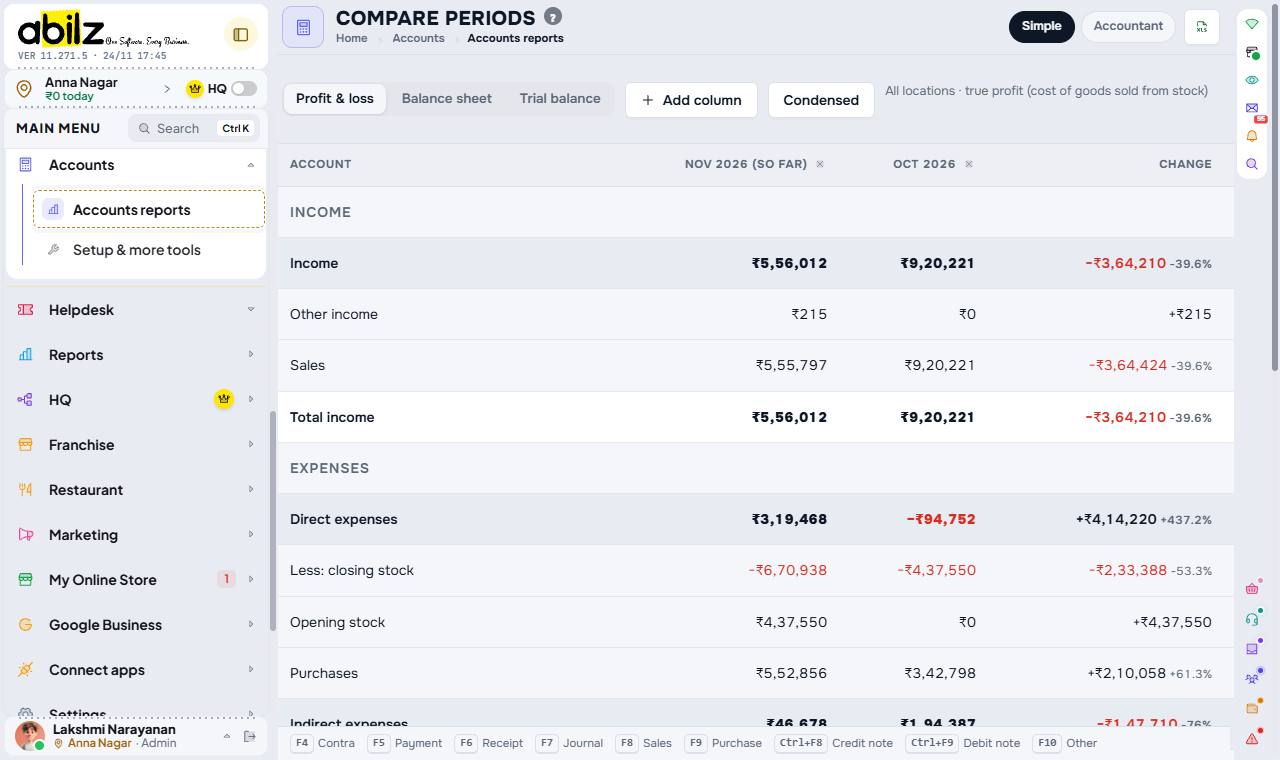
Compare periods
- Pick Profit & loss, Balance sheet or Trial balance.
- Add column (or Alt+C, as in Tally) adds a period: this month, last month, the same month last year, this year, last year or your own dates. For the Balance sheet and Trial balance a column is a date: today, the end of last month, 31 March.
- The Change column shows how much moved between the oldest and the newest column, with the %.
- Condensed (Alt+F5) shows only the group totals; Detailed shows every account. Click an account, or press Enter on it, to open its ledger.
The numbers are the same as each single report. In Accountant words the groups are Tally's own (Sundry Debtors, Indirect Expenses and the rest).
Exceptions
Accounts › Accounts reports › Exceptions. Like Tally's exception reports, one page lists what looks wrong:
- Stock below zero: more was sold than came in.
- Accounts on the wrong side: cash below zero, a cost in credit, money owed in debit.
- Customer invoices late, with the interest so far at the rate in Get paid settings.
- Supplier bills past due.
- Entries out of the period: dated after today or before your books start.
- Entries not in the books yet: optional, post-dated and reversing entries, and entries waiting for the owner's OK.
Open a line to see the entries and go straight to the page that fixes them.
Stock value: basis of values
Reports › Accounts & GST › Stock value (or O on the Gateway) shows stock the way your books value it: at average cost, FIFO cost or LIFO cost, as set in Settings › Accounts & tax setup › Accounting settings under Stock value method (see Accounting settings). Ctrl+B (or Next basis) shows it at the selling price or the last purchase price, only to look: the books and true profit always use your method.
Something wrong in this guide?
