

Design My App › Design › App theme opens first.
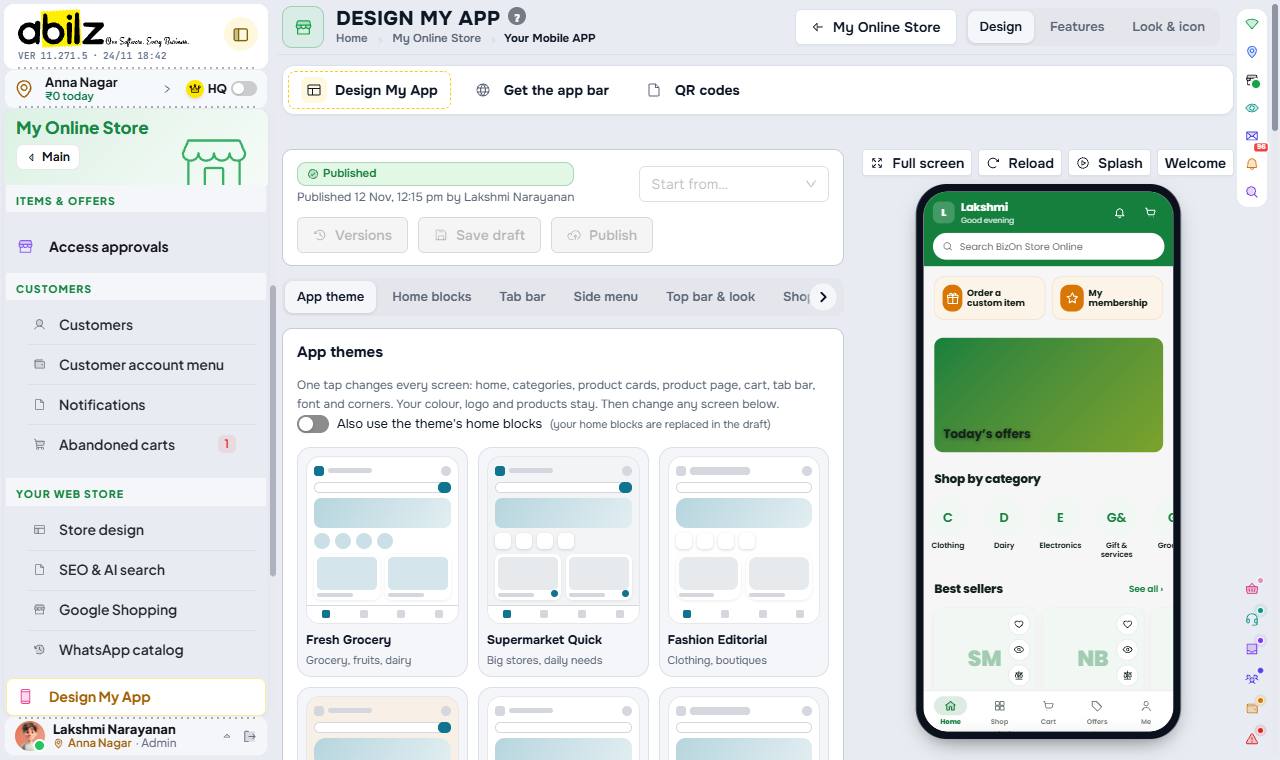
- Design My App › Design › App theme opens first. Tap one of 20 themes and the phone shows the whole app in that look: Fresh Grocery, Supermarket Quick, Fashion Editorial, Beauty Soft, Sneaker Clean, Sports Active, Bold Dark, Pastel Cards, Café, Restaurant & Food, Bakery Sweet, Health & Pharmacy, Tech Store, Hardware Pro, Luxe Boutique, Florist & Gifts, Kids & Toys, Glass Modern, Minimal, Classic Store.
- A theme sets the home header, categories, product cards, product page, size choices, bottom buttons, cart, screen colour, headings, font, corners and tab bar. Your colour, logo, products and home blocks stay (switch on Also use the theme's home blocks to take its home layout too).
- Then change any screen on its own: Home (header, filter button, categories, screen colour, headings) and Products (card style, soft panel behind photos, product page layout, size choices, bottom buttons, cart).
- Tip: product photos on a plain or white background look best. Switch on Soft panel behind photos for ordinary photos.
- Save draft, then Publish to send it to every phone.
Was this helpful?
Something wrong in this guide?
Still stuck?Press ? in your portal, then Raise a ticket. It carries the page you are on.
Contact AbilZ