

My Online Store opens as its own menu from the Main menu. Overview shows your store's links, how ready the website and app are, today's work and sales.
My Online Store › My Online Stores › Overview. My Online Store is a row in the Main menu: tap it and My Online Store opens as its own menu, with a picture at the top (‹ Main takes you back). Its sections: Orders & money, Items & offers, Wholesale, Customers, Your Web Store, Your Mobile APP and Setup. The old Online menu is gone: its orders are in My Online Store › Orders & money › Orders, and outside websites and marketplaces are in Connect apps › Online channels.
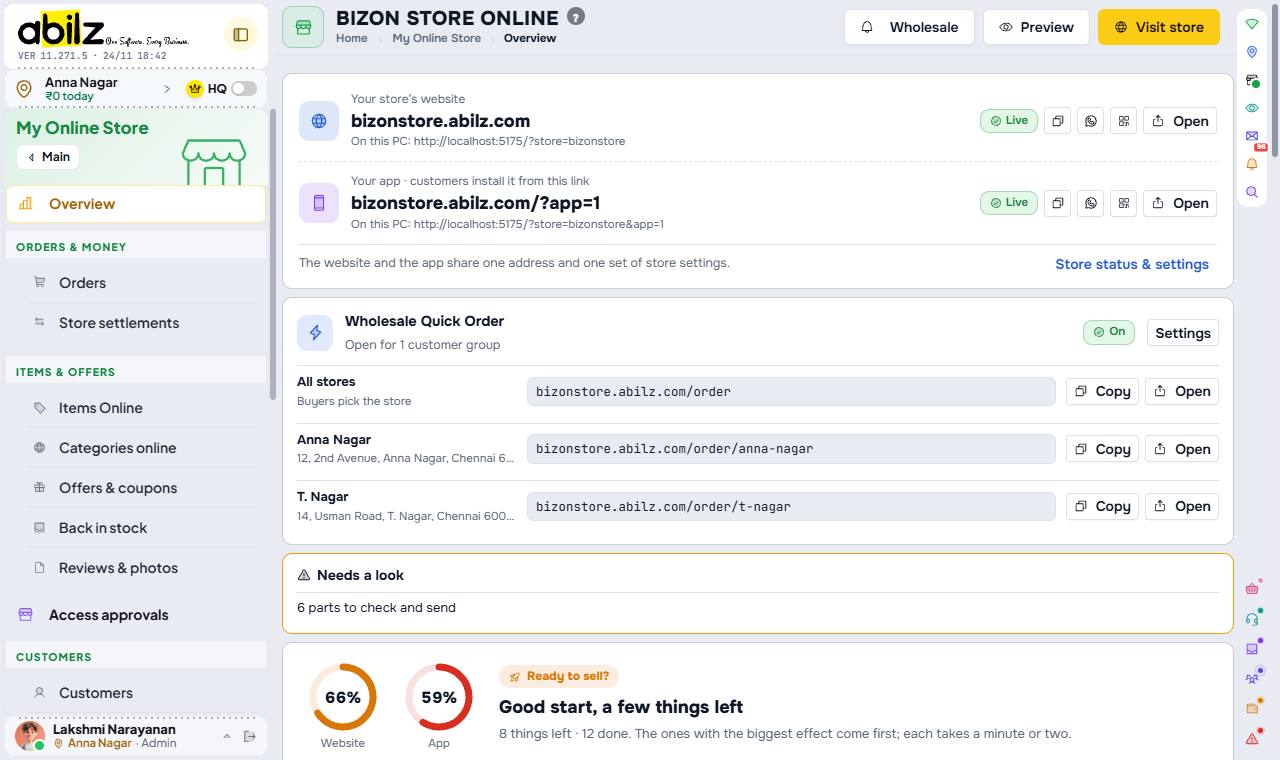
On the Overview:
- Your store's links: the website address and, with the app, the app's install link. Copy, Share on WhatsApp or show a QR code to print. When the store is not open yet, Open the store opens it.
- Preview and Visit store at the top.
- Needs a look: anything on the store that needs you now.
- How ready you are: a ring for the website, the app and both, then the next few things that matter most (the biggest effect first), each with why it matters and one Fix button. See everything by website and app shows the full list; it fills in by itself as things are done.
- Today's work and sales: pick Today, 7 days, 30 days or 90 days. Orders, sales and the average order against the time before, visits, and the work waiting: new orders to accept, packed to send, on the way, ready for pickup, wholesale orders and access asks, reviews to approve and quote requests. Tap one to open it.
- Your app (with the shopping app): installs on Android and iPhone, phones that allow notifications, orders from the app today, and how many opened the last notification.
- Quick cards: Items Online, Offers & coupons, Delivery & payment and Store settings.
Tip A location that only sells on the store (not the one that runs it) sees its own orders here.
Was this helpful?
Something wrong in this guide?
Still stuck?Press ? in your portal, then Raise a ticket. It carries the page you are on.
Contact AbilZ