

Every unpaid invoice and debit note, by how late: Not due yet, 1–30, 31–60, 61–90, over 90 days late.
Sales › Get paid › Dues & reminders lists every unpaid invoice and debit note.
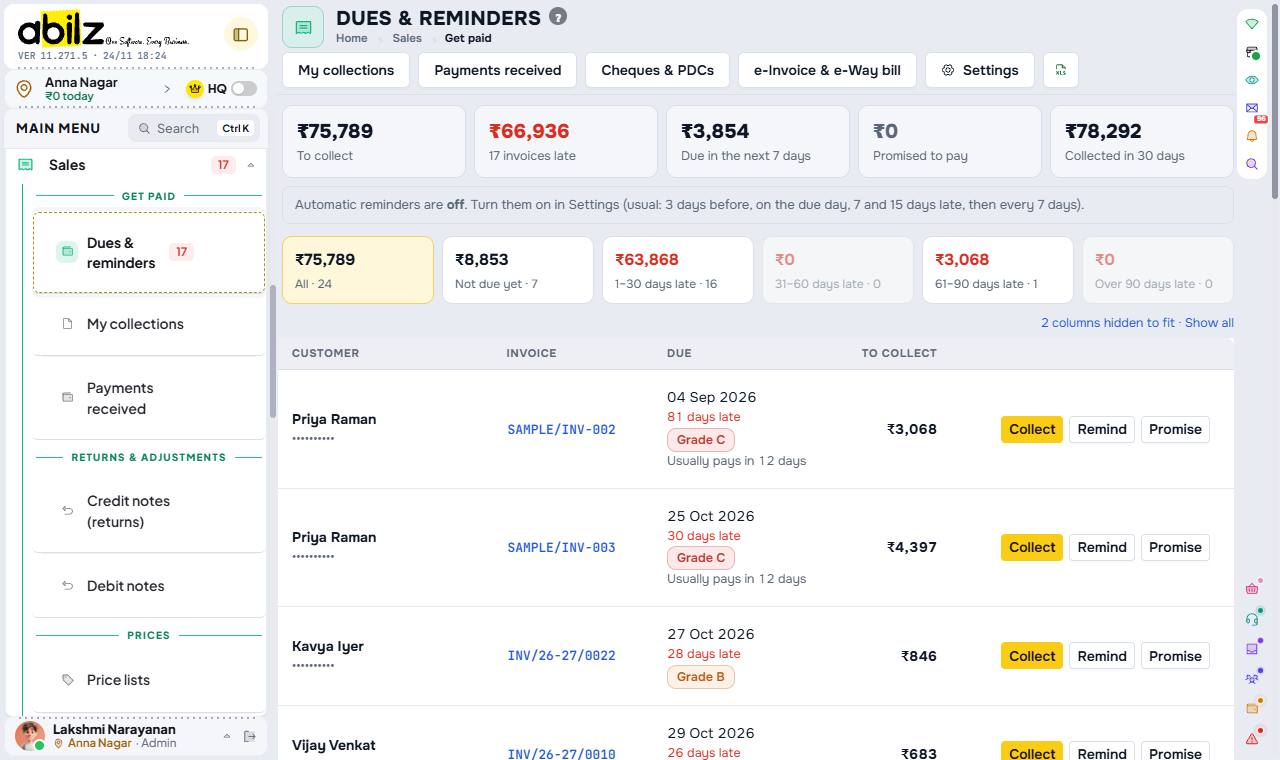
- On top: To collect, how much is late, what is Due in the next 7 days, what is Promised to pay, and what was Collected in 30 days.
- The groups by how late: All, Not due yet, 1–30, 31–60, 61–90 and Over 90 days late. Tap a group to see only it.
- Each row shows the customer, the invoice, the due day (how many days late, the customer's credit Grade and how many days they usually take to pay, with likely late when they usually pay late), what is To collect, the Collector, and the promise and last reminder.
- Collect: record a payment. Remind: send a reminder now. Promise: the day the customer said they will pay, with a note; automatic reminders wait till then.
- Collector: pick who collects from each customer. They see their customers in Sales › Get paid › My collections, with what they collected today and the cash to hand over.
- The buttons on top open My collections, Payments received, Cheques & PDCs and e-Invoice & e-Way bill.
Automatic reminders. The line above the groups says whether they are on. Press Settings on the page (Payment reminder settings): they are off until you turn them on. Usual days: 3 days before the due day, on the due day, 7 and 15 days late (change them; minus = before), then again every 7 days. One reminder per invoice on each day, never twice. Send by WhatsApp, SMS (both from the message wallet) or Email, with the pay online link, and only above an amount if you like. Checked every morning after 10 am.
The due day is the invoice's due date, else its date plus the days in its payment terms (Net 30 = 30 days).
Something wrong in this guide?
