

How every document list and document page works: filters, many at once, the bottom bar, printing and sending.
Quotations, sales orders, invoices, delivery notes, credit and debit notes, purchase orders, purchase bills, returns and transfers all use the same list and the same page.
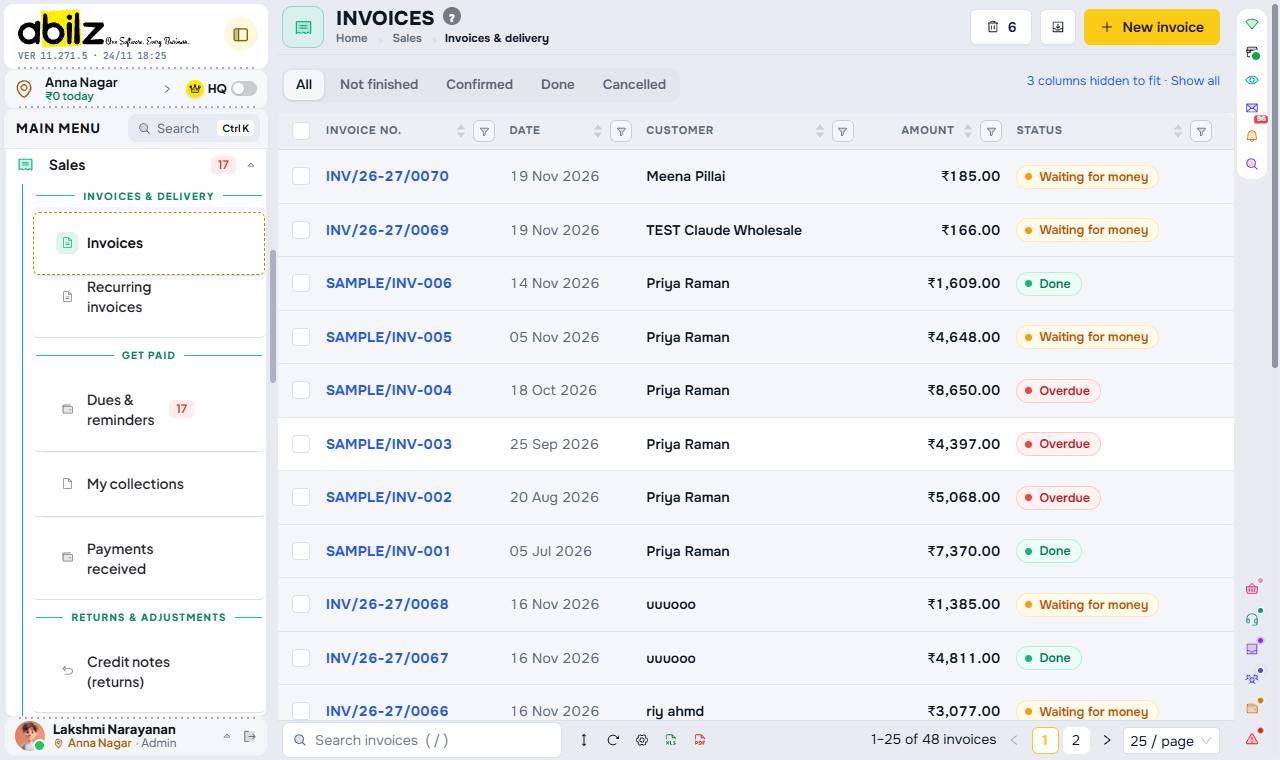
The list
- Columns show the Date, Number, the customer or Supplier bill no., Location, Items, Amount, Balance due and Status. Choose the columns you need.
- Tick several documents to work on many at once, for example Send orders to suppliers, Receive, Pay supplier, Duplicate (repeat order), Print labels, Email to suppliers, or turn orders into direct purchases.
The page
- Add items by search or scan, set quantities, prices, discounts and tax on each line. + Add a note prints a note under an item; a text row adds a heading or remark between items.
- The bottom bar has the next step for that document, for example Record payment, Receive, Confirm.
- Print offers Original, Duplicate for transporter, Triplicate and Office copy. Send by email or WhatsApp; invoices can carry an online link to view and pay, and orders a status link the customer can approve.
- A purchase bill spreads freight over the lines to get the real cost of each item. When the new cost changes your margin, AbilZ suggests a new price that keeps the old margin.
- Goods received by count: count what arrived; differences are logged and the sender is told. Serial numbers: scan or type one per line.
Was this helpful?
Something wrong in this guide?
Still stuck?Press ? in your portal, then Raise a ticket. It carries the page you are on.
Contact AbilZ