

In the order the work happens: quotes and orders, invoices and delivery, to do, get paid, returns, prices and the sales team.
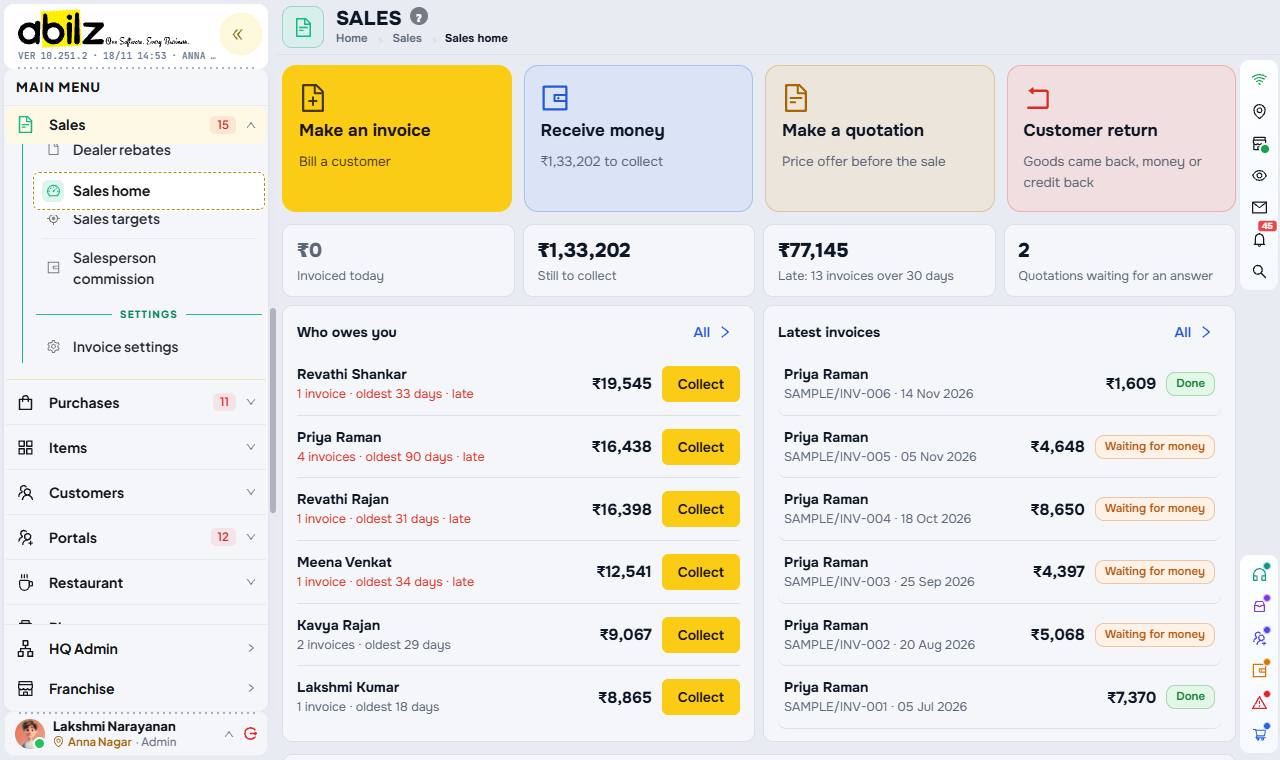
The Sales menu is in the order the work happens. A number beside a row is waiting work only.
- Sales › Sales home: the big buttons for the everyday jobs (Make an invoice, Receive money, Make a quotation, Customer return), what you invoiced today, what is still to collect and what is late, Who owes you (with Collect) and the Latest invoices.
- Sales › Quotes & orders: Quotations, Sales orders, Proforma invoices.
- Sales › Invoices & delivery: Invoices, Delivery notes, Goods on approval, Route sales, Recurring invoices.
- Sales › To do: the work waiting, as tabs at the top of their list: Quotations to follow up (on Quotations), Orders to deliver (on Sales orders), Delivery notes to invoice (on Delivery notes) and Approval goods late (on Goods on approval). Their counts show on the list's row in the menu.
- Sales › Get paid: Dues & reminders, My collections, Payments received.
- Sales › Returns & adjustments: Credit notes (returns), Debit notes.
- Sales › Prices: Price lists, Customer prices, Dealer rebates.
- Sales › Sales team: Sales targets, Salesperson commission.
Good to know
- The tabs at the top of a page show each page's menu icon: grey when closed, in the menu's colour when open.
- Invoice settings is in Settings › Selling & POS › Invoice settings.
- Counter bills are in the Point of Sale [POS] menu: Sell, Bills, Counters & staff, Missed sales.
- Gift cards are in Customers › Loyalty › Gift cards. Cheques & PDCs and e-Invoice stay in Accounts; Dues & reminders has buttons to them.
Was this helpful?
Something wrong in this guide?
Still stuck?Press ? in your portal, then Raise a ticket. It carries the page you are on.
Contact AbilZ