

Note anything a customer asked for that you could not sell.
- At the counter, search for the item. When nothing matches, tap Customer asked for "…". You can also open Menu › Asked, not available at any time.
- Pick the item, or keep the words the customer used (for example "red saree 42").
- Pick why you could not sell it: Not stocked, Out of stock, Size or colour, Price too high, or Other.
- Add how many they wanted and, if they want a call, their mobile number and name.
The note is saved even without internet. It goes up to the server when the counter is online again.
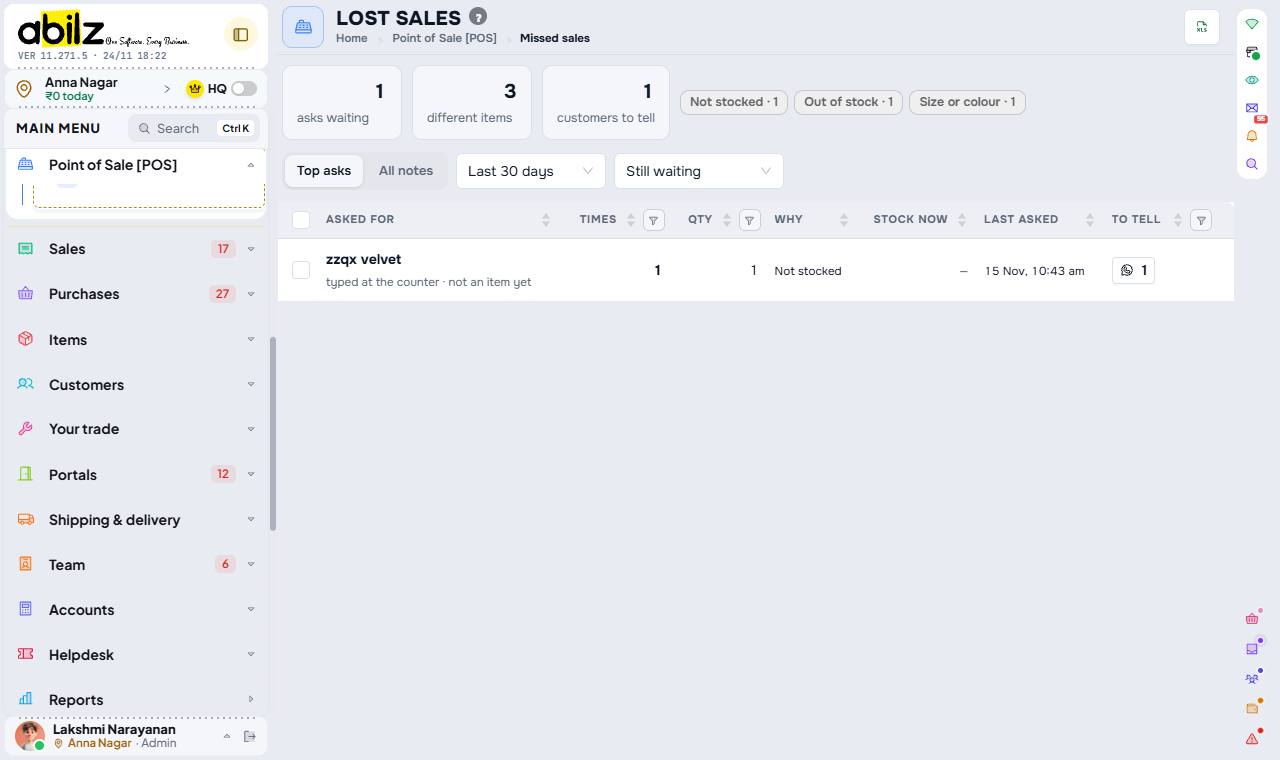
Point of Sale [POS] › Missed sales › Lost sales has two tabs:
- Top asks lists the most-asked items first. For each one it shows how many times it was asked, the quantity, the reasons, the stock now and the customers waiting.
- All notes lists every note.
What you can do with the asks:
- Tick asks and press Make purchase order. This makes one draft purchase order for each supplier, with the quantity customers asked for. Typed names cannot be ordered until they are added as items.
- Press Mark told or Not ordering to close asks without ordering.
- Press the To tell number to see the waiting customers. Each Tell opens WhatsApp with a ready message ("… is now in stock").
Was this helpful?
Something wrong in this guide?
Still stuck?Press ? in your portal, then Raise a ticket. It carries the page you are on.
Contact AbilZ