

Steps of % off before a batch expires, applied by themselves and growing as the date comes closer.
Items › Tracking & warranty › Batches & expiry › Expiry discounts (a tab at the top of Batches & expiry). For items tracked by batch and expiry date.
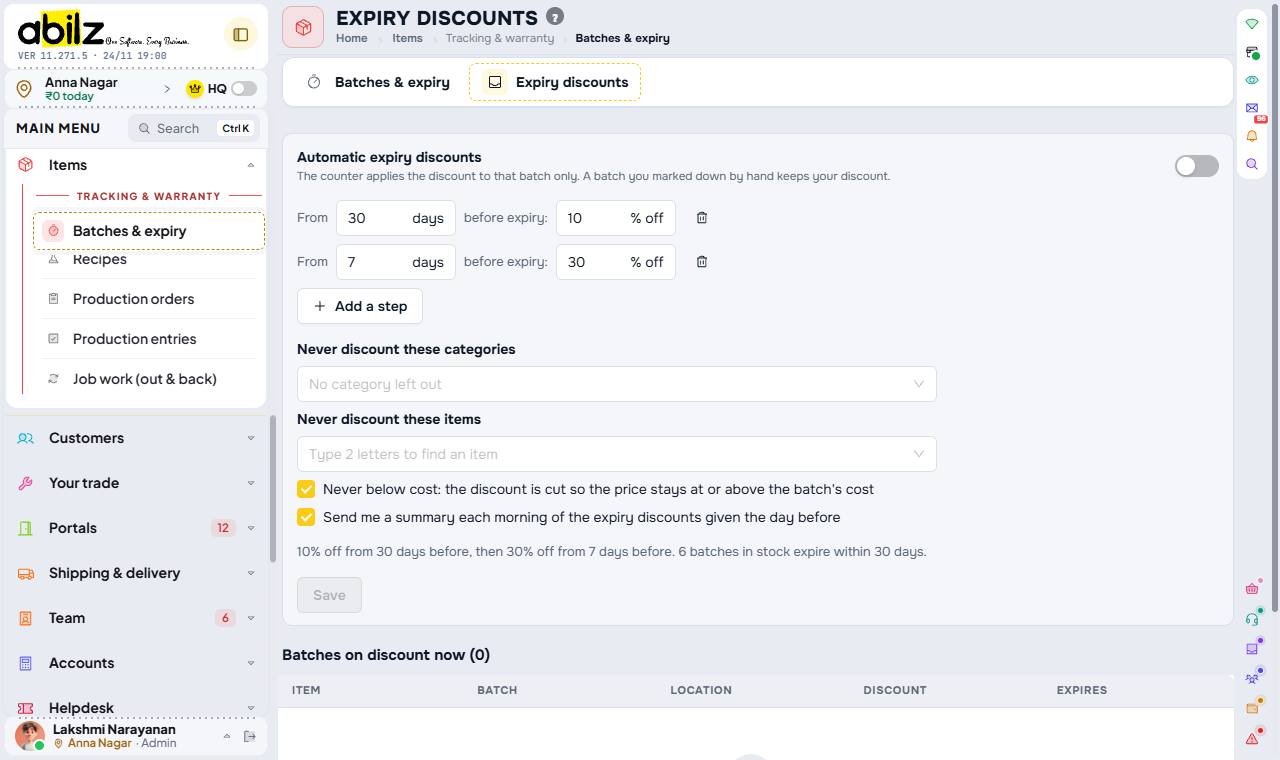
- Add the steps: how many days before expiry, and the % off. For example 10% off 30 days before, 25% off 15 days before, 50% off 7 days before. Remove step takes one away.
- Choose what is never discounted: Never discount these categories and Never discount these items.
- Never below cost (on to start): the discount is cut so the price stays at or above what the batch cost you. A batch with no margin gets no discount.
- Send me a summary each morning (on to start): a notification with yesterday's expiry discounts and the items that took the most.
- Switch on Automatic expiry discounts. Because AbilZ will change prices by itself, a window first explains it with an example and lists every batch that gets a discount from today, with its price before and after. Tick I understand prices will change by themselves and press Yes, switch on, then Save.
Every batch gets its discount by itself, and it grows as the date comes closer. Automatic expiry discounts are off until you switch them on.
At the counter the discount is applied to that batch only and shows on the bill. A batch you marked down by hand keeps your own discount.
A batch past its expiry date is never sold: the counter refuses it with the item and batch named.
The list shows the discounts running now: the Item, the Batch, the Location, the Discount and when it Expires. See also Batches, serial numbers and warranty.
Something wrong in this guide?
