

Move stock from a location where it sells slowly to one where it sells fast, in one tap.
Items › Stock › Stock on hand, the Suggested transfers into part, lists stock to bring in to the location you are working in from your other locations, and Create transfers makes the draft transfers (nothing moves until each transfer is sent and received).
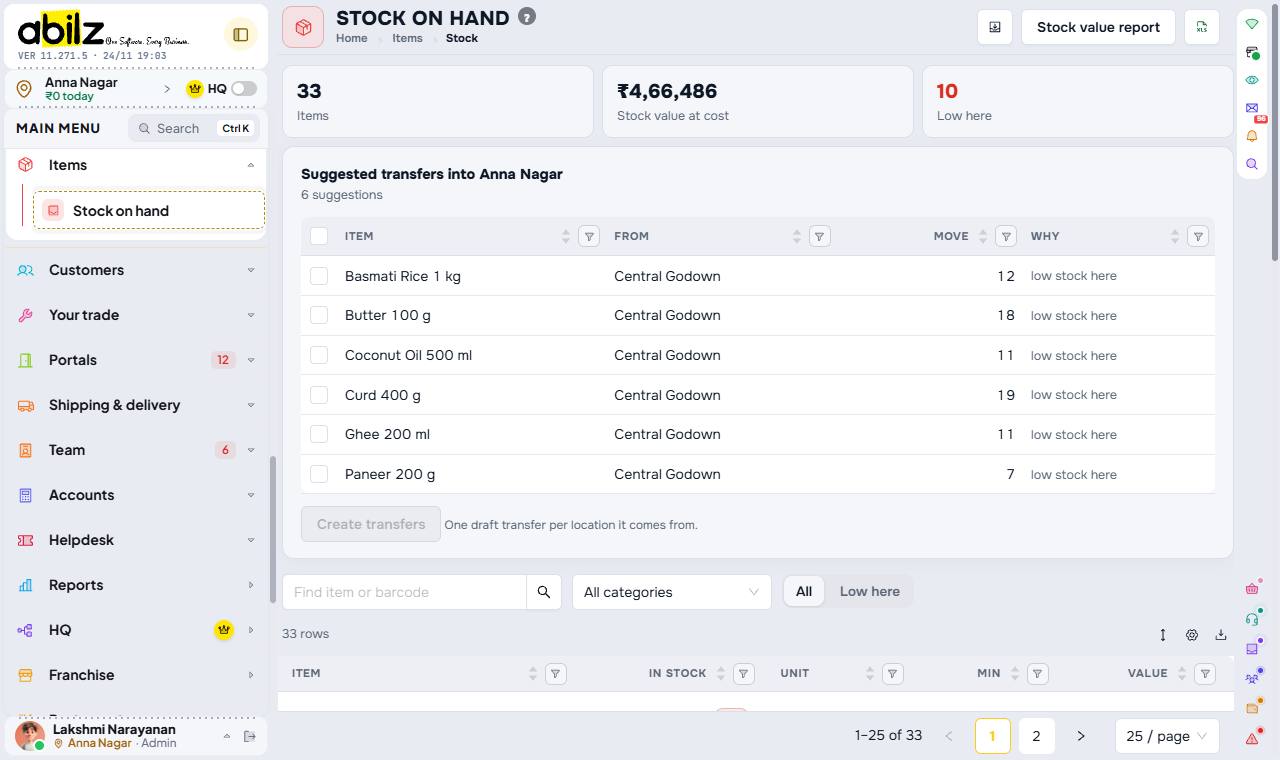
Suggestions come two ways:
- Low stock here: this location is at or under its minimum and another has plenty.
- By sales speed (Smart stock transfer in Settings › Start here › Features, under Stock): using the last 30 days of sales, an item whose stock lasts more than the slow days at one location (or is not selling there) moves to a location where it lasts less than the fast days. The fast location is filled up to twice the fast days of its sales; the slow one keeps the fast days of its own sales. The Why column says, for example, "sells 3 a day there (2 days left), not selling here".
Only the locations with Smart stock transfer switched on take part, so you choose which locations share stock.
The page shows only the location you are working in. In HQ view (the owner and people with HQ access) it shows a column for each location and the Suggested transfers between locations.
Was this helpful?
Something wrong in this guide?
Still stuck?Press ? in your portal, then Raise a ticket. It carries the page you are on.
Contact AbilZ