

Items earning less than their target margin, with the price that brings the margin back.
Items › Prices & margins › Price check › Margin guard (a tab at the top of Price check). Items show here when a cost rises or a price is too low.
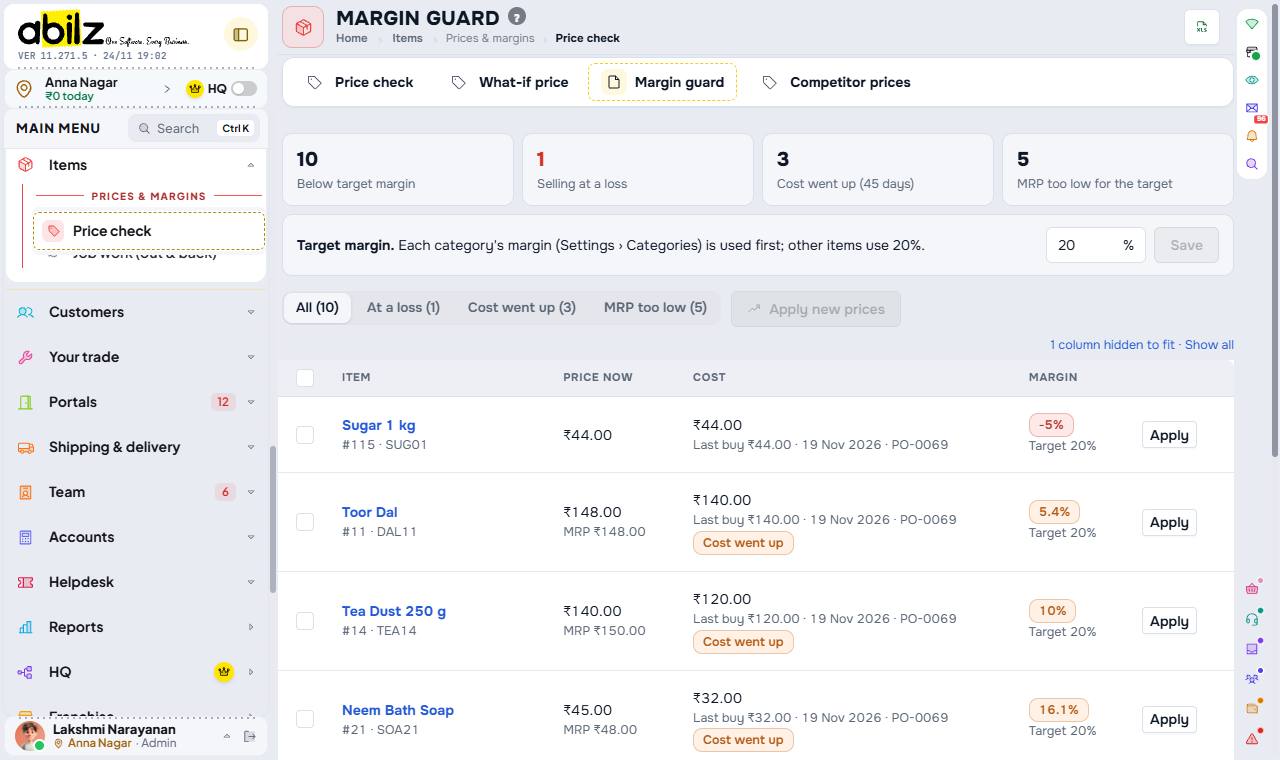
- Target margin: each category's own margin (Settings › Items · basics › Categories) is used first; other items use the default % you set here. Items below their target are listed.
- Each item shows why it is here: Below target margin, Selling at a loss, Cost went up (in the last 45 days) or MRP too low to reach the target. Items whose cost rose show first.
- Each line has the Price now, the Cost (average cost), the Margin and the New price that brings the margin back. Change the new price if you want.
- Press Apply on a line, or tick several items and press Apply new prices. When Price approvals is on, the change goes to the owner first.
When nothing is left, the page says every item meets its target margin.
Was this helpful?
Something wrong in this guide?
Still stuck?Press ? in your portal, then Raise a ticket. It carries the page you are on.
Contact AbilZ