

When the GST rate of an HSN code changes, change every item with that code in one step, from the date it applies.
Items › Prices & margins › Update prices › GST rate change (a tab at the top of Update prices). For a GST change announced for an HSN code, for example soaps under 3401.
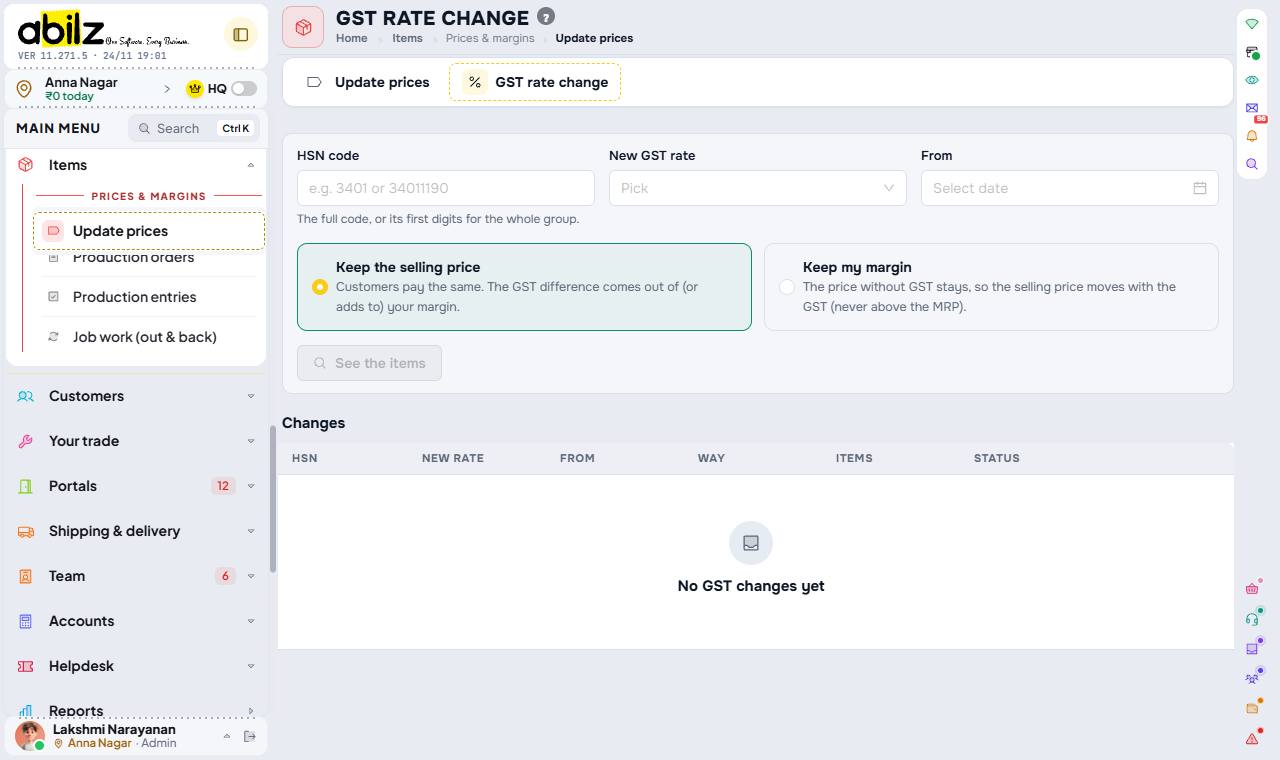
- Type the HSN code: the full code, or its first digits for the whole group (for example 3401 or 34011190).
- Pick the new rate and the date it applies from.
- Choose what happens to the price:
- Keep the selling price: customers pay the same. The GST difference comes out of (or adds to) your margin.
- Keep my margin: the price without GST stays, so the selling price moves with the GST (never above the MRP; an item that would pass it is Held at the MRP).
- See the items: check each item's new selling price before you save.
- Save. New labels wait for printing the day before, and the change applies by itself on the date.
The list below shows every GST change with its New rate, the date it applies From, the number of Items and its Status. If no item with that HSN code has a different rate, the page says there is nothing to change.
Was this helpful?
Something wrong in this guide?
Still stuck?Press ? in your portal, then Raise a ticket. It carries the page you are on.
Contact AbilZ